DNS Basic Concepts, Fundamentals, and Terminology
Every endpoint on a computer network requires a unique IP address. IP addresses are numbers separated by colons. Instead of numbers, humans prefer names to refer to things. Names are easier to remember and use. The DNS service allows you to map a descriptive name to an endpoint's IP address. After mapping, you can access endpoints using their names. When you access an endpoint by its name, the DNS service resolves its name to an IP address.
Your system does not use the DNS service directly. It uses a resolver service to resolve DNS requests. By default, the resolver service is available on all operating systems. Operating systems use it to translate names. When you access a network resource using its name, the application you use to access the resource requests the resolver service to translate the name into the IP address. The resolver service checks all configured sources in a sequence until it finds the IP address associated with the name. Once it finds the IP address associated with the name, it shares the IP address with the requester application and does not check the next source in the sequence.
Translating a name into an IP address is called name resolution. It uses three sources in sequence. These sources are the cache, the hosts file, and the DNS service. When the resolver service resolves a name, it saves a copy of the translation in the cache. Next time, when it receives a request for the same name, it answers the query from the cache.
If the cache has no entry for the requested name, it checks the hosts file. All operating systems include this file. You can use this file to map IP addresses and names. By default, this file has entries only for the local system. You can use this file to map names with IP addresses on a small network. The resolver service checks this file before using the DNS service. Because of this, you can also use this file to map the names you do not want the DNS service to resolve. If this file does not contain an entry for a name, the resolver service checks the configuration files to determine the IP address of the system providing the DNS service.
Different operating systems store the IP address of the system providing DNS service in different locations. For example, Linux stores it in the /etc/resolv.conf file while Windows saves it in the attached network card's configuration file.
Although you can install and run the DNS service on the local system, it is rare and is typically used only in a lab environment for learning and troubleshooting. In the real world, the DNS service is installed and run on a dedicated computer. The system that provides the DNS service is called the DNS server. The system that accesses the DNS service from the DNS server is called the DNS client. Based on network size and requirements, administrators may deploy multiple DNS servers. On DNS clients, they can configure the IP addresses of the DNS servers they want clients to use.
DNS Terminology
DNS terminology defines the terms DNS uses for its operation. The following section describes the essential terms you need to understand how DNS works.
Resources
A resource is an endpoint on a network. It can be a computer, a mobile, a printer, or any other device connected to the network.
IP addresses
An IP address is a unique numeric address of a resource. Resources use IP addresses to identify each other on the network. Two end devices can communicate and transfer data only if they know each other's IP address.
Domain Name System (DNS)
The Domain Name System (DNS) is a service that maps IP addresses to descriptive names. After implementing it, you can use names instead of IP addresses.
Resource records
DNS uses resource records to relate IP addresses to names. Each resource record maps an IP address to a name and defines the properties associated with that name.

Zone files
DNS uses zone files to save resource records. Zone files are simple text files. These files save resource records in lines. A zone file stores the data for a domain in the DNS database.
DNS database
A DNS database is a collection of all Zone files. A Zone file stores data for a domain in the DNS database.
DNS Servers
A DNS server is a system that runs the DNS service.
Distribution and delegation of the DNS database
Although you can store all Zone files on a single DNS server, they are typically spread across multiple servers for easier management and scalability. For example, suppose a DNS database has millions of Zone files. If you store this database on a single server. Each DNS client will send its queries to that server.
That server must check all records from all Zone files to resolve the query. As a result, the server takes a long time to respond to each query. Besides this, if multiple administrators are responsible for managing the DNS database, they all update the zone files on the same server. It makes management difficult. To solve these problems, you can break the database into smaller zone files and distribute them on multiple DNS servers.
Each DNS server will store Zone files for only a portion of the database and will reply only to queries for that portion. This process is called the distribution and delegation of the DNS database. It reduces the load on DNS servers and improves network performance.
DNS database hierarchy
DNS uses a hierarchical structure to distribute and delegate the database. It uses a dot to separate two levels in the structure. In the DNS database, the rightmost part of a name represents the highest level, and the leftmost part represents the lowest level. Names are written left-to-right, but processed right-to-left.
Let's take an example. In the name www.google.com, the lowest level is www, and the highest level is com. You read this name as www.google.com. However, the DNS processes this name as com.google.www.
DNS uses this approach to distribute and delegate records in the hierarchy. It groups all names that belong to it at the same level and stores them on a separate server. It saves the name on the server for the lowest level in the hierarchy. It saves only the information that tells where the record exists on all upper-level servers.
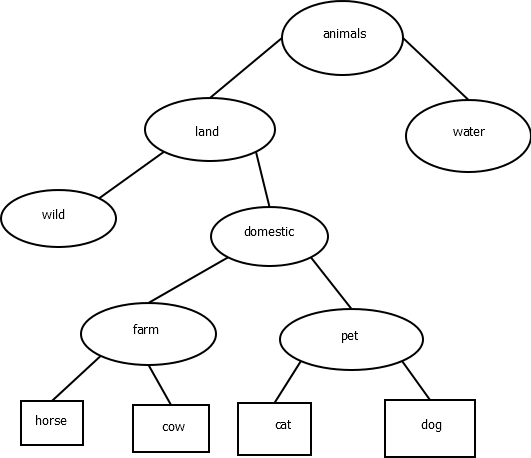
Let us take an example. Suppose you want to build and organize the animal database. For this, you can use the name animals at the top of the hierarchy. You can divide animals into two types: land animals and water animals. To refer to these in the database, create two levels: land and water, both below the top level. You can further divide land animals into two types: wild and domestic. For this, make two sub-levels and place them under the land level. You can further break down the domestic level into two categories: farm animals and pet animals. Under these sublevels, you can add animal names.
The following image shows this hierarchy.
The following is an example resource record in this database.
cat.pet.domestic.land.animals.
The pet server will save this name. All upper servers (domestic, land, and animals) will only save a reference to the pet server in the hierarchy. Each server stores only a portion of the database. It stores information only about its child server. Since each server stores information about its child server, a requested name can be easily found if the search starts from the top-level server.
Let's understand it through this example. Suppose you want to find the records associated with the domain name cat.pet.domestic.land.animals.
For this, start by searching the top-level server. As I mentioned earlier, the rightmost part of the name belongs to the top level. In this name, the rightmost part is the animals. So, you will start searching for the name from the animals server. The animals server has no information about the requested name. However, it knows the next level in the search path. So, it will send you to the land server. Using the same method, the land server will forward you to the domestic server. Again, the domestic server will send you to the pet server. The pet server has a record for the name cat. It will provide information about this name.
This way, a server only needs to store information about its child server. No matter how deep a name's record is, you can easily find it if the database follows the proper hierarchy.
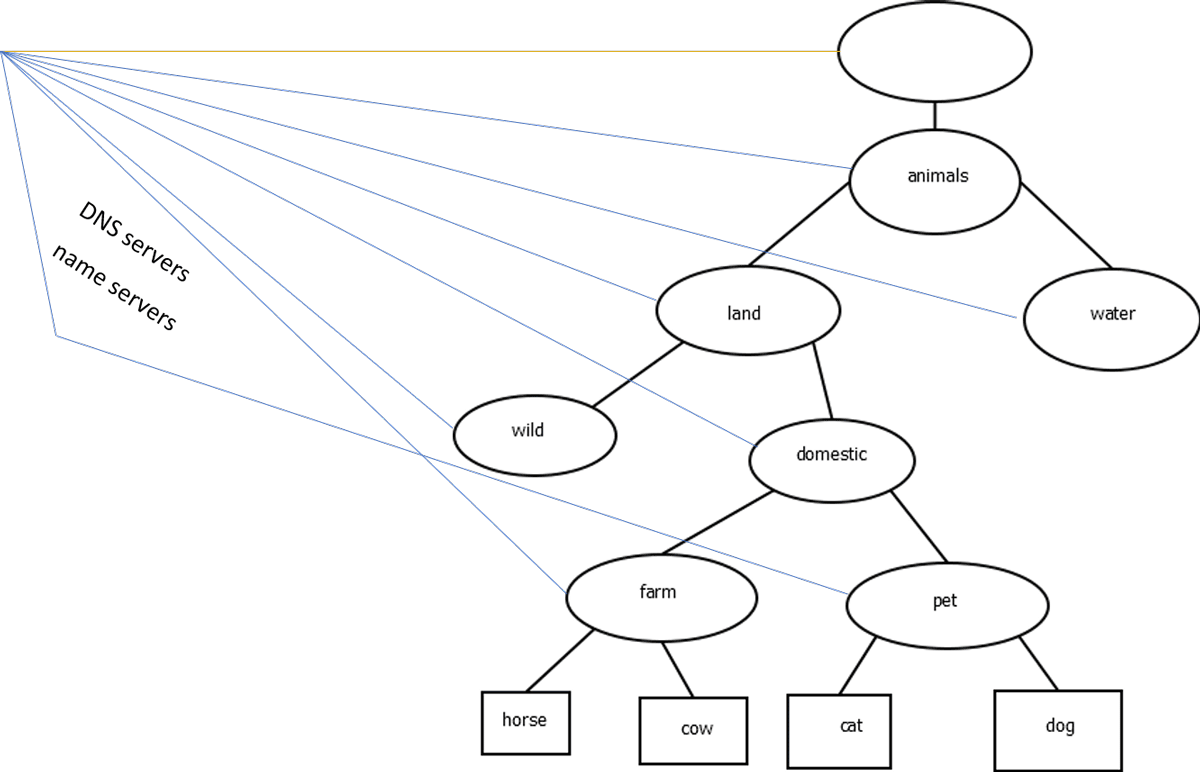
With a minor difference, DNS uses the same approach to organizing its database. DNS uses a null character to define the highest level. If you convert this example database into a DNS database, it would look like the following figure.

Node
A node is a system. It can be an endpoint, a server, or any other computer or device that needs and uses the name. In this example database, cat, dog, horse, cow, farm, pet, wild, domestic, land, water, and animals are examples of nodes. To access a node by its name, you must create a resource record for the node in the DNS database. The resource record includes the node name and IP address.
Host
A host is a node that hosts and runs a service. A host can also get its name from the service it runs. For example, if a host runs a web service, it is called the web server. If a host runs the DNS service, it is called the DNS server or name server. A name server runs a DNS service and provides answers to DNS queries. In this example, farm, pet, wild, domestic, land, water, animals, and root (null label) are examples of name servers.
DNS query
A DNS query is a request that the resolver system sends to DNS servers to determine a resource's name or IP address.
Resolver system
A resolver system is a system that communicates with DNS servers through DNS queries to resolve names or IP addresses.

Domain
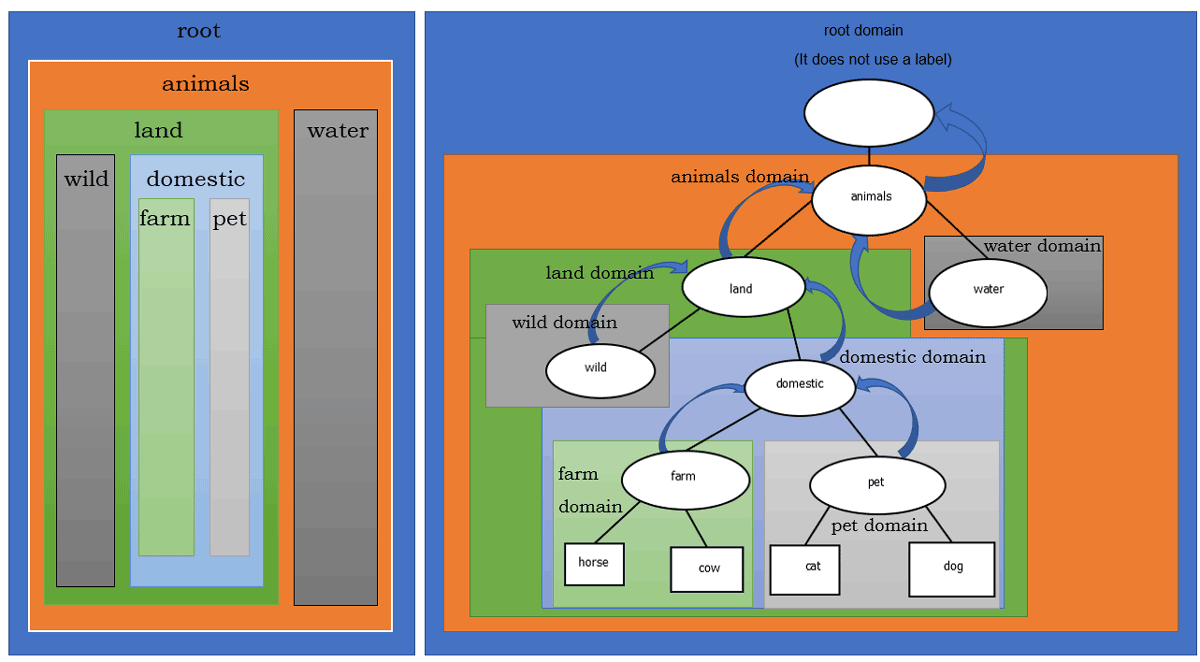
A domain is a group of nodes that use the same identification label.
Identification label
An Identification label is the name of a level in the hierarchy. There are some rules for it.
- It can be up to 63 characters in length.
- Two domains cannot use the same name on the same level. You must select a unique name for each domain on the same level. If you want to create two domains on the same level, use different names for both.
- You cannot use a null character. The DNS system reserves it for the root domain.
Subdomains
You can create multiple levels of domains. A domain that is a child of another domain is called a subdomain.
Root domain
DNS starts its hierarchy from the root domain. A root domain uses a null label. The root domain is the topmost server in the hierarchy. You cannot create a domain above it. In other words, it is the only domain without a parent domain. Besides this domain, all other domains have a parent domain.
Domain name
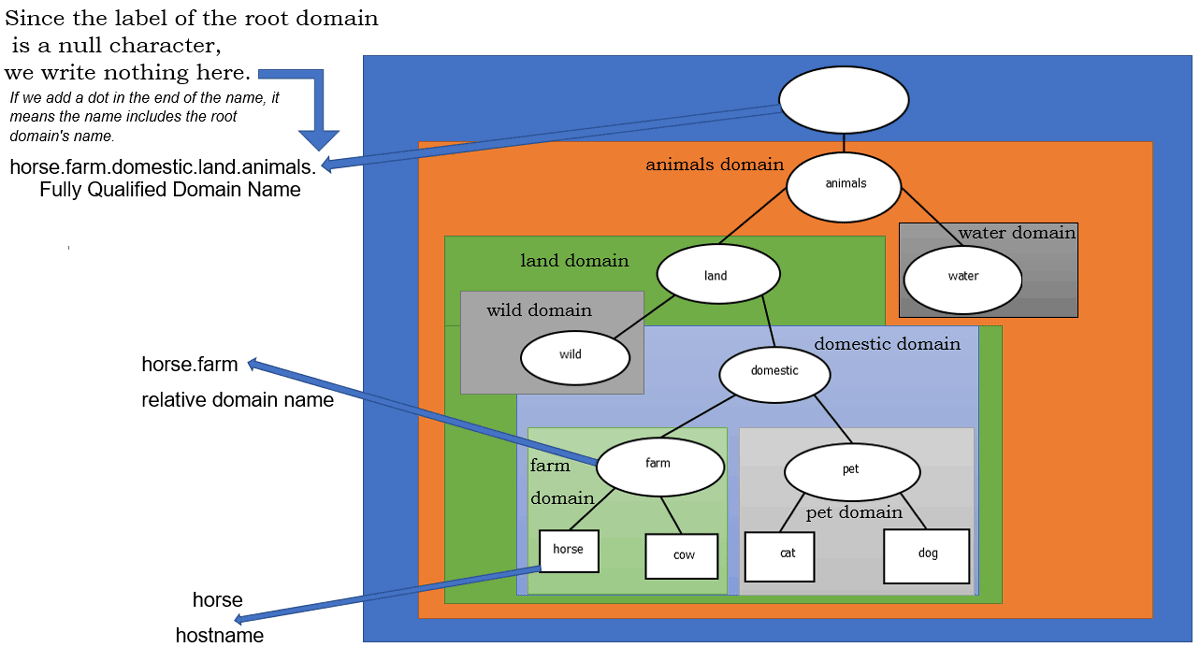
A domain name is the name of a node that includes the name of its parent domain. A node's name without its parent domain name is called a hostname. If a node uses its name within its parent's domain, it is called a relative domain name. A node's name with all domain names in the hierarchy up to the root domain is called a fully qualified domain name (FQDN).
Since the root domain uses a null character for its name, a node's fully qualified domain name always ends with a dot.
Domain namespace
A domain name space is a complete structure of a DNS database. It includes all levels, from the lowest to the highest. It starts from the lowest and goes up to the topmost level.
DNS on the Internet
The Internet uses the same hierarchy for the DNS database. It starts from root domains and places all subsequent domains under them. There are 13 root domains. For these root domains, there are 13 root name servers. These root name servers use static IP addresses that never change. By default, resolver systems know about these IP addresses. These IP addresses are statically configured or listed in configuration files that resolver systems use.
When an end device sends a name resolution query to the resolver system, the resolver forwards the query to the nearest root name server and follows the referral to reach the name server that can resolve it.
Root name servers do not resolve queries. They provide a referral to top-level domains (TLDs). You can classify TLDs into two basic types: generic and country-specific. The com, edu, net, org, and mil are examples of generic TLDs. Examples of country-specific TLDs include us, ca, in, and br.
Just as root name servers do not resolve queries, TLD name servers do not either. They provide a referral to second-level domains (SLDs). SLDs are available for public use. When you purchase a domain name, you buy an SLD. You also need to configure a name server for your SLD. That name server resolves queries for all resources within the domain. For example, in the domain name example.com, the com is the TLD, and the example is the SLD.
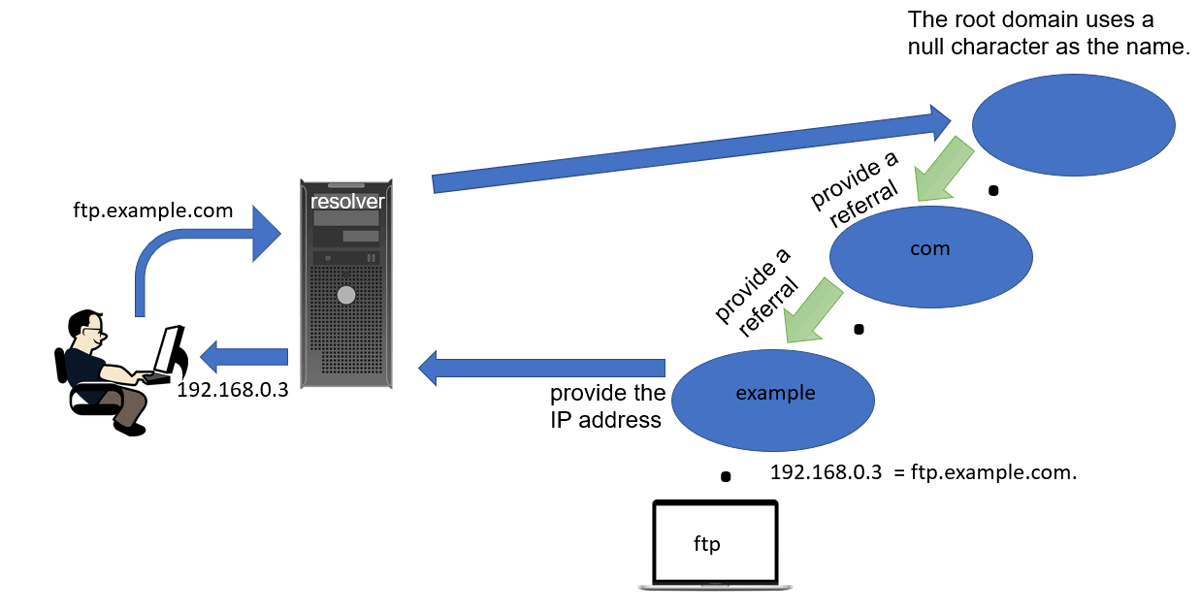
If a resolver wants to know the IP address of ftp.example.com, it sends the first query to the nearest root name server. The root name server provides a referral to the com name server. The com name server provides a referral to the example name server. The example name server provides the IP address associated with the name ftp.example.com.
This tutorial is part of the following tutorial series on DNS server concepts and configurations.
Chapter 01 How to configure DNS Server in Linux
Chapter 02 DNS Basic Concepts, Fundamentals, and Terminology
Chapter 03 DNS Server and Query Types Explained
Chapter 04 The /etc/hosts, /etc/resolv.conf, and /etc/nsswitch.conf files
Chapter 05 The dig command on Linux
Chapter 06 The nslookup command on Linux
Chapter 07 Change or specify the DNS server to the nslookup command
Chapter 08 DNS zone File Format
Chapter 09 The TTL and ORIGIN directives in the zone file
Chapter 10 Types of resources records in zone files
Chapter 11 The SOA Record Explained in the DNS zone file
Chapter 12 The NS Record, Glue record, and Lame Delegation
Chapter 13 The MX record in a zone file explained
Chapter 14 The a, aaaa, and cname DNS record types
Chapter 15 The pointer (PTR) record and Reverse mapping Explained
Chapter 16 How to configure a caching-only name server
Chapter 17 How to configure DNS Forwarding and a forwarder name server
Chapter 18 How to configure a primary or master authoritative name server
Chapter 19 How to configure a secondary or slave authoritative name server
Chapter 20 How to configure reverse mapping on DNS name servers
Conclusion
The Domain Name System (DNS) is an essential network service. It maps and translates user-friendly names into IP addresses. It uses complex terminology for its functions and operations. In this tutorial, I described this terminology and explained how each term works.
Author Laxmi Goswami Updated on 2026-06-29