Basic Linux Commands Explained with Examples
This tutorial explains the essential Linux commands through examples. Learning these commands helps you perform file editing, listing, and managing tasks effectively on the Linux command prompt. These are basic system administration commands. These are available on all Linux flavors. You can use these commands on any variation or version of Linux.
The pwd command
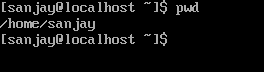
The pwd command prints the absolute path of the current working directory. An absolute path starts from the root (/) directory. This command does not accept any argument.
The mkdir command
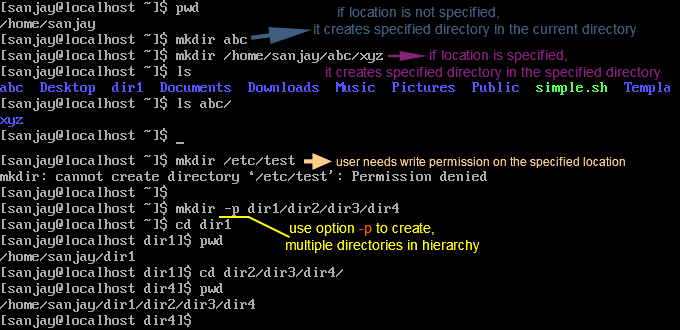
The mkdir command creates a new directory. To create a new directory, we have to specify the name and location of that directory with this command as the argument. If we do not specify the destination directory, it creates the specified directory in the current directory. This command creates a new directory only if the user has permission to write to the specified location. If not, this command does not work. This command also allows us to create a hierarchy of sub-directories. To create multiple directories in a hierarchy, use option -p with this command.
The cd command
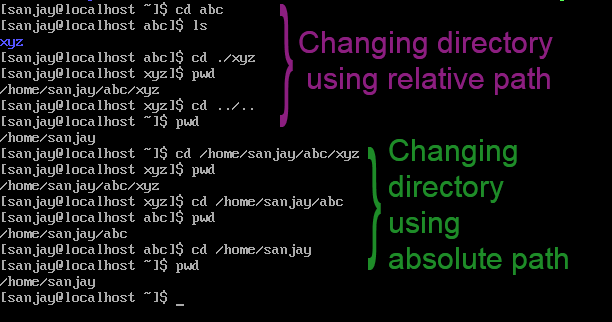
The cd command changes the current working directory to the specified directory. It supports absolute and relative paths as arguments. A relative path starts from the current working directory, whereas an absolute path starts from the root (/) directory.
The touch command
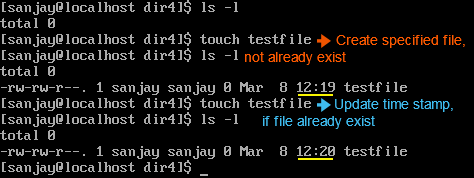
The touch command creates an empty file. Like the mkdir command, creating a new file also requires the name and location of the file. If the specified file already exists, it updates the time stamp of that file.
The cat command
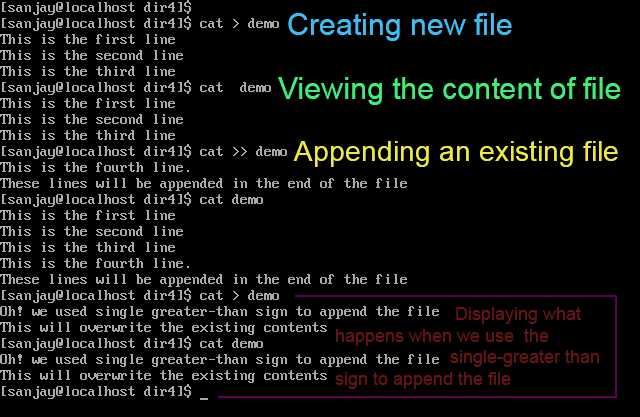
This command performs three tasks: create a new file, append contents in an existing file, and print the file contents.
- If we use a single greater-than sign (>) as an argument, it creates a new file.
- If we provide the file name after using the double greater-than sign (>>), it appends the existing file.
- If we type the file name without using any sign, it prints the contents of the specified file.
- This command uses the CTRL + D key combination to save the opened file.
Key points
- This command does not allow us to edit or modify an existing file.
- When appending an existing file, this command does not display the existing contents of that file.
- When appending an existing file, always use the double greater-than sign (>>). If you use the single greater-than sign (>), it overwrites the existing contents without any warning or notification.
- When displaying the contents of the specified file, it lists all contents at once. If the file contents need more space than the screen size, the screen scrolls the contents and displays only the last ones.
The more command
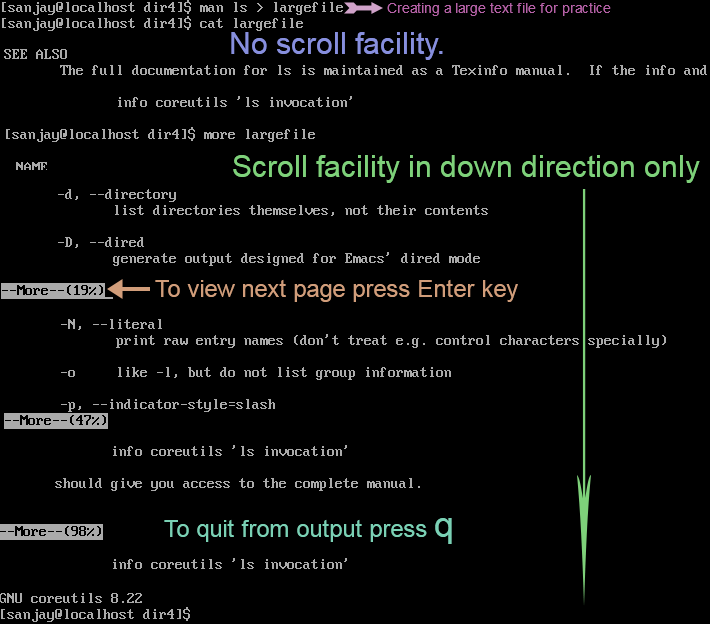
The more command allows us to view large files. Unlike the cat command, it does not display all content at once. It shows only the content that can fit on the screen. It displays the remaining content when we press the Enter key. It provides a scroll facility only in the down direction.
The less command
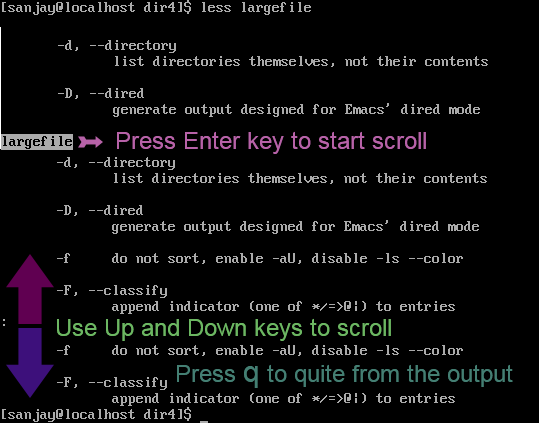
The less command also displays the contents of the specified file. This command provides a scroll facility in both directions. It uses the Up and Down arrow keys to scroll in the up and down directions.
Similarities and differences between the cat command, more command, and the less command
All three commands display the contents of the specified file. The cat command displays all contents and does not provide the scroll facility. The more command displays the contents equal to the screen size and provides a scroll facility only in the down direction. Like the more command, the less command displays the contents equal to the screen size. But it offers a scroll facility in both directions.
The head command
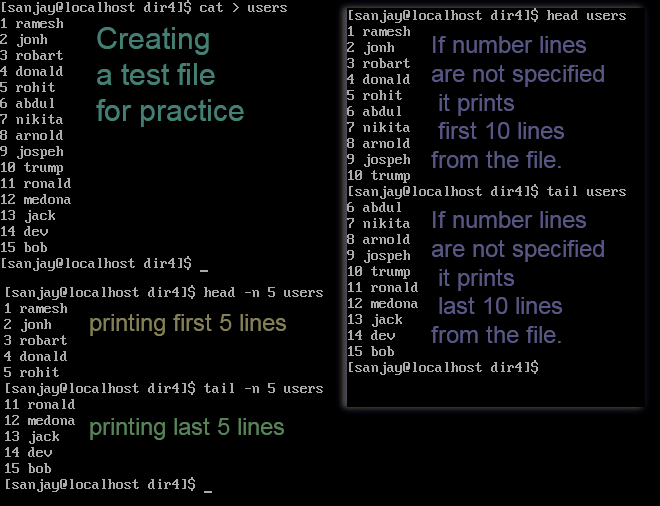
The head command prints the specified lines from the specified file. The -n option specifies the number of lines. It prints the specified number of lines from the top of the file.
The tail command
The tail command works the same way as the head command, except it prints the specified number of lines from the bottom of the file.
Similarities and differences between the head command and the tail command
- Both commands print the specified number of lines from the specified file. Both commands use the option -n to display the number of lines.
- If the number of lines is not specified, both commands print 10 lines.
- The only difference between both commands is that the head command prints the line from the top of the file while the tail command prints the lines from the bottom.
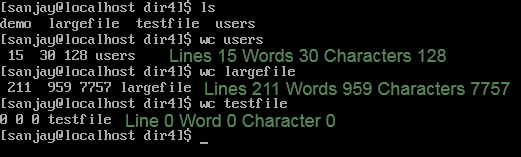
The wc command counts the lines, words, and characters. It displays the counted number in the following sequence: Lines, Words, and Characters.
The rmdir command
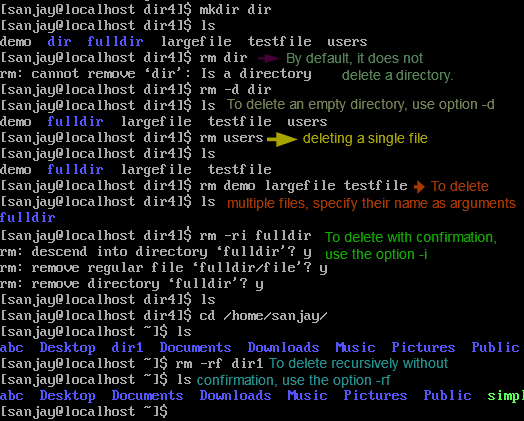
The rmdir command deletes an empty directory. If the directory is not empty, this command does not delete it.

The rm command
The rm command deletes the file. The following table lists the frequently used options with this command.
| Option | Description |
| -d | To delete an empty directory. By default, it does not delete a directory. |
| -r | To delete recursively. |
| -i | To verify each file or directory before deleting. To delete, press y. To skip, press n. |
| -f | To delete without verification. |
| -rf | To delete all contents of a directory, including its subdirectories and files. |
The ls command
The ls command lists the contents of a directory. Without any argument, it lists the contents of the current directory. To list the contents from another directory, specify its absolute pathname as the argument.
The following table lists the frequently used options with the ls command.
| Option | Description |
| -l | To list the contents in the list format. List format provides additional content details such as file type, permission, creation date and time, owner and group information, etc. |
| -a | To include hidden files in output. By default, the ls command does not list these files. |
| -R | To list contents recursively. By default, the ls command lists the contents of the specified directory only. This option forces it to list the contents from the subdirectories of the specified directory. |
| -ltr | To list the contents in the sorted list format. Output is sorted based on the last modification date and time. |

Conclusion
In this tutorial, I explained the fundamental commands of Linux. Learning these commands helps you manage the system effectively.
Author Laxmi Goswami Updated on 2026-05-18