VLSM Subnetting Examples and Calculation Explained
There are two types of subnetting: FLSM and VLSM. FSLM subnetting uses the same subnet mask for all subnets. VLSM subnetting allows you to choose subnet masks based on the network requirement. VLSM extends FLSM. This tutorial explains how VLSM works and how to use it to create IP subnets based on requirements.
VLSM is a repeated FLSM. You first use FLSM to split the given subnet into equally sized subnets. Then, you use FLSM again on the created subnets to break them into smaller, same-sized subnets. You repeat this process until you get the subnets that meet your requirements.
FLSM, use subnetting charts. A subnetting chart tells you the number of subnets you can get from a given IP subnet having a specific number of host addresses.
Class A Subnetting chart
| Subnet mask (In slash notation) | Subnet mask (In decimal notation) | Network bits | Host bits | Subnets | Block Size or Total Hosts addresses | Valid hosts addresses |
| /8 | 255.0.0.0 | 0 | 24 | 1 | 16777216 | 16777214 |
| /9 | 255.128.0.0 | 1 | 23 | 2 | 8388608 | 8388606 |
| /10 | 255.192.0.0 | 2 | 22 | 4 | 4194304 | 4194302 |
| /11 | 255.224.0.0 | 3 | 21 | 8 | 2097152 | 2097150 |
| /12 | 255.240.0.0 | 4 | 20 | 16 | 1048576 | 1048574 |
| /13 | 255.248.0.0 | 5 | 19 | 32 | 524288 | 524286 |
| /14 | 255.252.0.0 | 6 | 18 | 64 | 262144 | 262142 |
| /15 | 255.254.0.0 | 7 | 17 | 128 | 131072 | 131070 |
| /16 | 255.255.0.0 | 8 | 16 | 256 | 65536 | 65534 |
| /17 | 255.255.128.0 | 9 | 15 | 512 | 32768 | 32766 |
| /18 | 255.255.192.0 | 10 | 14 | 1024 | 16384 | 16382 |
| /19 | 255.255.224.0 | 11 | 13 | 2048 | 8192 | 8190 |
| /20 | 255.255.240.0 | 12 | 12 | 4096 | 4096 | 4094 |
| /21 | 255.255.248.0 | 13 | 11 | 8192 | 2048 | 2046 |
| /22 | 255.255.252.0 | 14 | 10 | 16384 | 1024 | 1022 |
| /23 | 255.255.254.0 | 15 | 9 | 32768 | 512 | 510 |
| /24 | 255.255.255.0 | 16 | 8 | 65536 | 256 | 254 |
| /25 | 255.255.255.128 | 17 | 7 | 131072 | 128 | 126 |
| /26 | 255.255.255.192 | 18 | 6 | 262144 | 64 | 62 |
| /27 | 255.255.255.224 | 19 | 5 | 524288 | 32 | 30 |
| /28 | 255.255.255.240 | 20 | 4 | 1048576 | 16 | 14 |
| /29 | 255.255.255.248 | 21 | 3 | 2097152 | 8 | 6 |
| /30 | 255.255.255.252 | 22 | 2 | 4194304 | 4 | 2 |
Class B Subnetting chart
| Subnet mask (In slash notation) | Subnet mask (In decimal notation) | Network bits | Host bits | Subnets | Block Size or Total Hosts addresses | Valid hosts addresses |
| /16 | 255.255.0.0 | 0 | 16 | 1 | 65536 | 65534 |
| /17 | 255.255.128.0 | 1 | 15 | 2 | 32768 | 32766 |
| /18 | 255.255.192.0 | 2 | 14 | 4 | 16384 | 16382 |
| /19 | 255.255.224.0 | 3 | 13 | 8 | 8192 | 8190 |
| /20 | 255.255.240.0 | 4 | 12 | 16 | 4096 | 4094 |
| /21 | 255.255.248.0 | 5 | 11 | 32 | 2048 | 2046 |
| /22 | 255.255.252.0 | 6 | 10 | 64 | 1024 | 1022 |
| /23 | 255.255.254.0 | 7 | 9 | 128 | 512 | 510 |
| /24 | 255.255.255.0 | 8 | 8 | 256 | 256 | 254 |
| /25 | 255.255.255.128 | 9 | 7 | 512 | 128 | 126 |
| /26 | 255.255.255.192 | 10 | 6 | 1024 | 64 | 62 |
| /27 | 255.255.255.224 | 11 | 5 | 2048 | 32 | 30 |
| /28 | 255.255.255.240 | 12 | 4 | 4096 | 16 | 14 |
| /29 | 255.255.255.248 | 13 | 3 | 8192 | 8 | 6 |
| /30 | 255.255.255.252 | 14 | 2 | 16384 | 4 | 2 |
Class C Subnetting chart
| Subnet mask (In slash notation) | Subnet mask (In decimal notation) | Network bits | Host bits | Subnets | Block Size or Total Hosts addresses | Valid hosts addresses |
| /24 | 255.255.255.0 | 0 | 8 | 1 | 256 | 254 |
| /25 | 255.255.255.128 | 1 | 7 | 2 | 128 | 126 |
| /26 | 255.255.255.192 | 2 | 6 | 4 | 64 | 62 |
| /27 | 255.255.255.224 | 3 | 5 | 8 | 32 | 30 |
| /28 | 255.255.255.240 | 4 | 4 | 16 | 16 | 14 |
| /29 | 255.255.255.248 | 5 | 3 | 32 | 8 | 6 |
| /30 | 255.255.255.252 | 6 | 2 | 64 | 4 | 2 |
VLSM Example
The following image shows a network. Perform VLSM subnetting for this network.
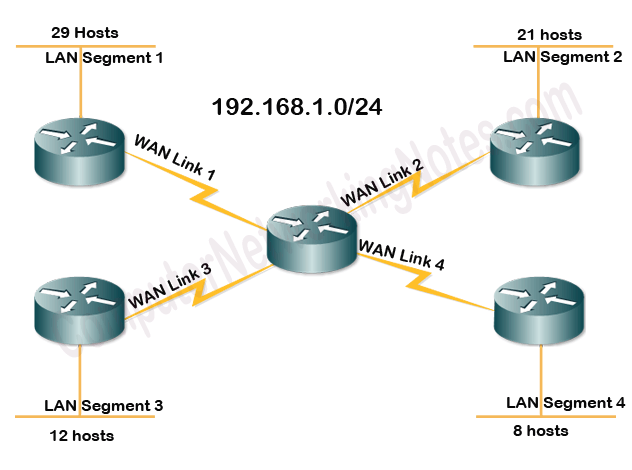
VLSM Subnetting
Arrange all segments in descending order based on their requirements.
Each segment needs two additional IP addresses: one for the network address and another for the broadcast address. Because of this, you must select a block size that provides IP addresses equal to or greater than the actual requirement for each segment.
Actual requirement = Total hosts + two (network and broadcast)
| No. | Segment | Host requirement | Block size that fulfills the host IP requirement | Valid hosts in block |
| 1 | LAN Segment1 | 29 | 32 | 30 (32 -2) |
| 2 | LAN Segment 2 | 21 | 32 | 30 (32 -2) |
| 3 | LAN Segment 3 | 12 | 16 | 14 (16-2) |
| 4 | LAN Segment 4 | 8 | 16 | 14 (16-2) |
| 5 | WAN Link 1 | 2 | 4 | 2 (4-2) |
| 6 | WAN Link 2 | 2 | 4 | 2 (4-2) |
| 7 | WAN Link 3 | 2 | 4 | 2 (4-2) |
| 8 | WAN Link 4 | 2 | 4 | 2 (4-2) |
In the next step, find the subnet mask in the slash notation that provides the required block size. The first and second segments need a block size of 32. The subnet mask /27 provides 8 subnets, each with 32 IP addresses.
0-31, 32-63, 64-95, 96-127, 128-159, 160-191, 192-223, 224-255
Assign the first two subnets to these segments.
0-31, 32-63, 64-95, 96-127, 128-159, 160-191, 192-223, 224-255
The next two segments need a block size of 16. The subnet mask /28 provides 16 subnets, each containing 16 IP addresses.
0-15, 16-31, 32-47, 48-63,64-79, 80-95, 96-111, 112-127, 128-143, 144-159, 160-175, 176-191, 192-207, 208-223, 224-239, 240-255
You cannot use the first four subnets. They contain the addresses you have already assigned to the first and second segments. Use the fifth and sixth subnets for the third and fourth LAN segments.
0-15, 16-31, 32-47, 48-63,64-79, 80-95, 96-111, 112-127, 128-143, 144-159, 160-175, 176-191, 192-207, 208-223, 224-239, 240-255
The next four segments need a block size of 4. The subnet mask /30 provides 64 subnets containing 4 IP addresses.
0-3, 4-7, 8-11, 12-15, 16-19, 20-23, 24-27, 28-31, 32-35, 36-39, 40-43, 44-47, 48-51, 52-55, 56-59, 60-63, 64-67, 68-71, 72-75, 76-79, 80-83, 84-87, 88-91, 92-95, 96-99, 100-103, 104-107, 108-111, 112-115, 116-119, 120-123, 124-127, 128-131, 132-135, 136-139, 140-143, 144-147, 148-151, 152-155, 156-159, 160-163, 164-167, 168-171, 172-175, 176-179, 180-183, 184-187, 188-191, 192-195, 196-199, 200-203, 204-207, 208-211, 212-215, 216-219, 220-223, 224-227, 228-231, 232-235, 236-239, 240-243, 244-247, 248-251, 252-255
The first 24 subnets contain the IP addresses you have assigned to the previous segments. You can use the subnets 25, 26, 27, and 28 for these segments.
0-3, 4-7, 8-11, 12-15, 16-19, 20-23, 24-27, 28-31, 32-35, 36-39, 40-43, 44-47, 48-51, 52-55, 56-59, 60-63, 64-67, 68-71, 72-75, 76-79, 80-83, 84-87, 88-91, 92-95, 96-99, 100-103, 104-107, 108-111, 112-115, 116-119, 120-123, 124-127, 128-131, 132-135, 136-139, 140-143, 144-147, 148-151, 152-155, 156-159, 160-163, 164-167, 168-171, 172-175, 176-179, 180-183, 184-187, 188-191, 192-195, 196-199, 200-203, 204-207, 208-211, 212-215, 216-219, 220-223, 224-227, 228-231, 232-235, 236-239, 240-243, 244-247, 248-251, 252-255
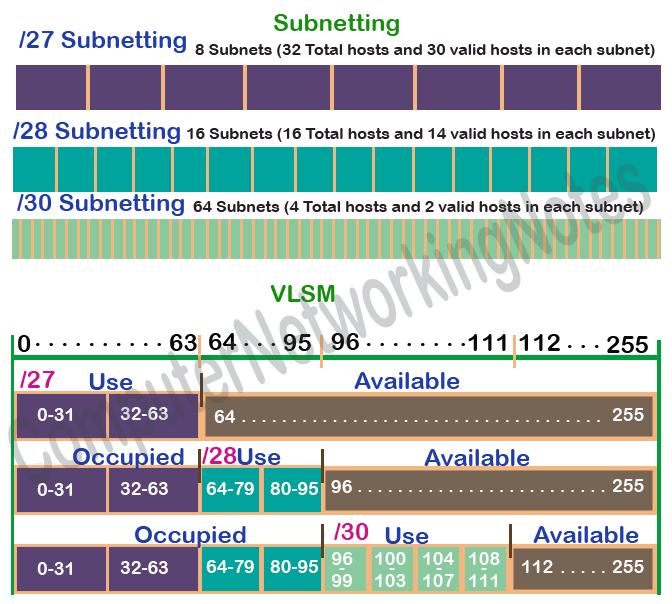
The following image shows the assigned IP subnets to each segment.
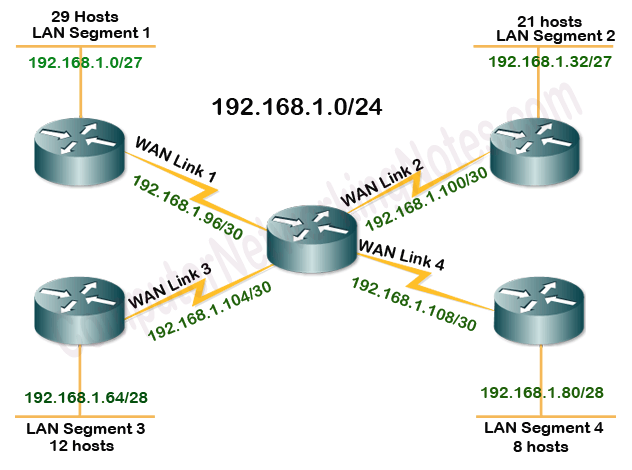
The following table summarizes all subnets.
| Segment | CIDR | Subnet Mask | Network Address | Broad cast Address | Valid host addresses |
| LAN Segment1 | /27 | 255.255.255.224 | 192.168.1.0 | 192.168.1.31 | 192.168.1.1 to 192.168.1.30 |
| LAN Segment 2 | /27 | 255.255.255.224 | 192.168.1.32 | 192.168.1.63 | 192.168.1.33 to 192.168.1.62 |
| LAN Segment 3 | /28 | 255.255.255.240 | 192.168.1.64 | 192.168.1.79 | 192.168.1.65 to 192.168.1.78 |
| LAN Segment 4 | /28 | 255.255.255.240 | 192.168.1.80 | 192.168.1.95 | 192.168.1.81 to 192.168.1.94 |
| WAN Link 1 | /30 | 255.255.255.252 | 192.168.1.96 | 192.168.1.99 | 192.168.1.97 to 192.168.1.98 |
| WAN Link 2 | /30 | 255.255.255.252 | 192.168.1.100 | 192.168.1.103 | 192.168.1.101 to 192.168.1.102 |
| WAN Link 3 | /30 | 255.255.255.252 | 192.168.1.104 | 192.168.1.107 | 192.168.1.105 to 192.168.1.106 |
| WAN Link 4 | /30 | 255.255.255.252 | 192.168.1.108 | 192.168.1.111 | 192.168.1.107 to 192.168.1.108 |
This tutorial is part of the tutorial series "IP Addressing, and Subnetting in Computer Networks Explained with examples". Other parts of this series are the following.
Chapter 01 Introduction to Subnetting
Chapter 02 Network Address Basic Concepts Explained with Examples
Chapter 03 The Subnet Mask and Slash Notation
Chapter 04 Converting Decimal IP Addresses to Binary and Binary to Decimal
Chapter 05 Basic Subnetting in Computer Networks Explained
Chapter 06 Subnetting Tutorial - Subnetting Explained with Examples
Chapter 07 Subnetting Tricks: Subnetting Made Easy with Examples
Chapter 08 FLSM Subnetting and VLSM Subnetting
Chapter 09 VLSM Subnetting Explained with Examples
Chapter 10 VLSM Subnetting Examples and Calculation Explained
Chapter 11 Route Summarization Advantages and Disadvantages
Chapter 12 Supernetting Tutorial: - Supernetting Explained with Examples
Conclusion
VLSM (Variable Length Subnet Mask) is a method of subnetting. It allows you to create subnets of different sizes. This tutorial explained VLSM subnetting using an example.
Author Laxmi Goswami Updated on 2026-05-10