How to access or open a Shell in Linux
There are several ways to get or access a shell interface in Linux. The three most common methods are the shell prompt, terminal window, and virtual console. Let's discuss these methods in detail.
The shell prompt
Linux arrives in two variations: Server and Desktop. The Server edition includes packages for a server system. The Desktop edition contains packages for a desktop system.
Server systems provide dedicated services and typically do not require a desktop environment to manage them. Because of this, the Server edition does not include a desktop environment. Desktop systems access services running on servers. They need a desktop environment to run productivity-related applications. For this, the Desktop edition contains a desktop environment.
In both types, the method to access the shell prompt is different. The Server edition automatically opens a shell prompt after login. On a Desktop edition, a user manually accesses the shell prompt after login. You can access a shell prompt only after login.
Let's access a shell prompt in both types.
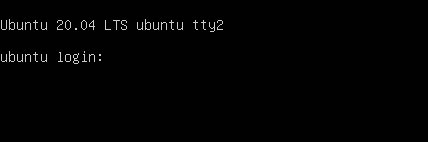
Boot your Linux system. You will get a text-based login prompt if the system does not include a desktop environment. The following image shows this login prompt on an Ubuntu system.
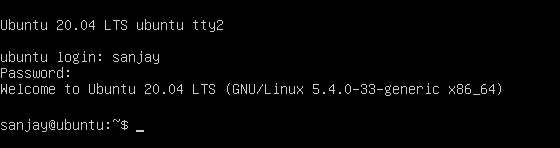
To log in, type your username and password. If the username and password are correct, Linux will present a shell prompt after the authentication.
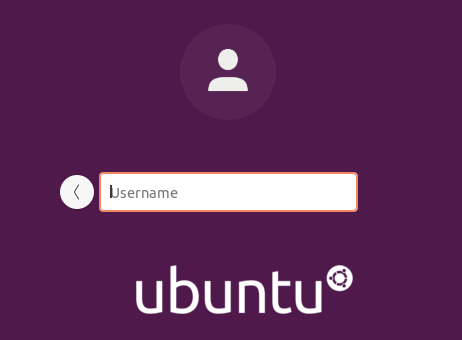
The system displays a graphical login screen if a desktop environment is present. The following image shows the graphical login screen on an Ubuntu system.
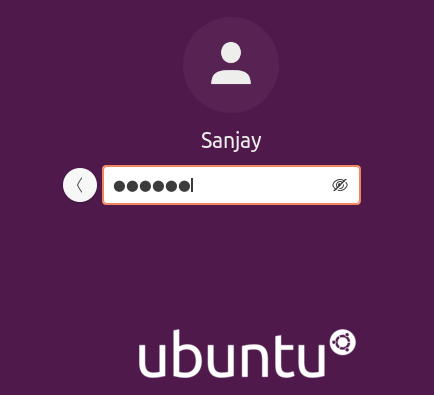
To log in, type your username and press the Enter key. After the username, type your password and hit the Enter key again. The following image shows this process on an Ubuntu system.
If the username and password are correct, Linux starts the graphical user interface for you. The following image shows the desktop environment that a user gets on Ubuntu.
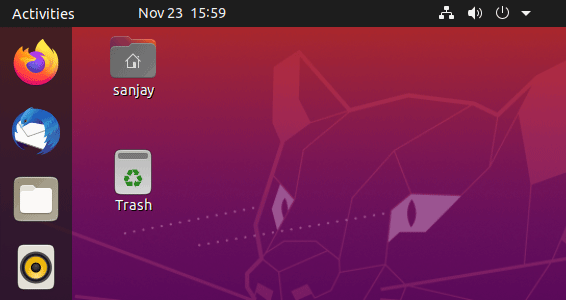
The following image shows the desktop environment that a user gets on CentOS/Red Hat.

As you can see in the above pictures, if you log in using the GUI (graphical user interface), Linux does not open a shell prompt automatically.
Accessing a shell through the terminal window
A terminal window is an application that starts the default shell in the GUI environment. To start a terminal window, right-click the Desktop and select the Open in terminal option from the right-click context menu.

You can access a shell prompt from any directory using the same right-click context menu. For example, the following image shows how a user can access a shell prompt from the Documents folder of his home directory.
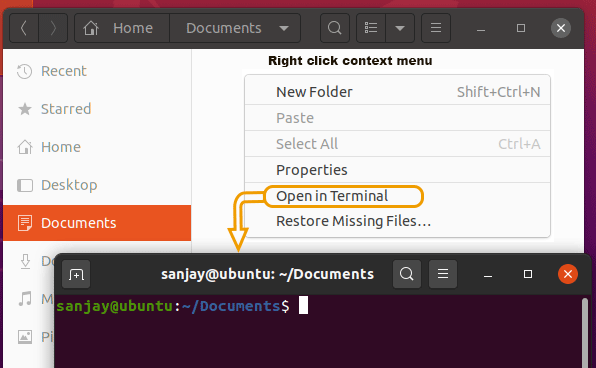
Different distributions usually use separate titles for this option, such as New Terminal, Terminal Window, Shells, Open in Terminal, and Xterm. Some distributions even do not include this option in the right-click context menu.
If this option does not exist in the right-click context menu, you can start a terminal window from the panel. Usually, Linux desktops include a panel at the top, bottom, or left of the screen from which you can start applications. You can open a terminal window from this panel as well.
For example, if your distribution uses the GNOME 2 desktop, you can open a terminal window through the following steps.
Applications => System Tools => Terminal
Use the following steps if your distribution has GNOME 3 desktop.
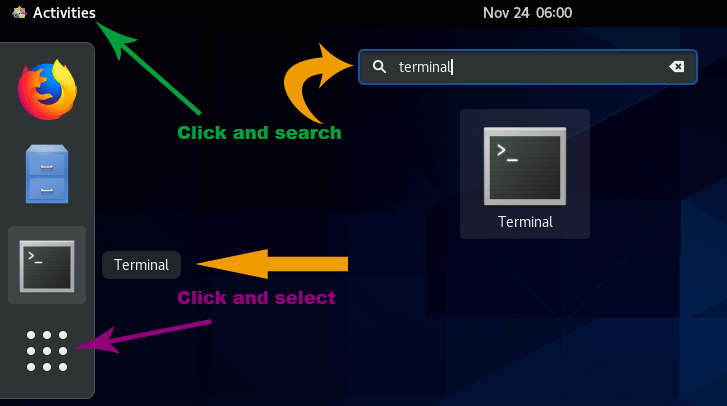
Activities => search for the Terminal in the search box => press the Enter key
The following image shows how to access a terminal window on a Centos/RedHat/Fedora system.
Accessing a shell by using virtual consoles
A virtual console is a way to open and use multiple shell sessions in addition to the existing GUI or CLI interface. Most Linux distributions provide six virtual consoles along with the graphical interface. You can access these terminals using the CTRL+ALT+F1 (or F2, F3, F4, F5, F6) keys. Since each virtual console opens a separate shell session, you can log in from a different user on each virtual console.
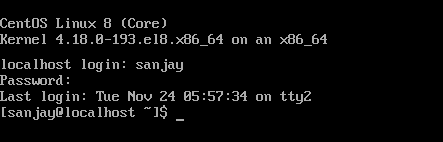
In Fedora/CentOS/Red Hat Linux, the first workspace is the GUI, and the next six virtual consoles are text-based virtual consoles. Use CTRL+ALT+(Related function key) to access text-based virtual consols. For example, to access the third virtual console, press CTRL+ALT+F3. To return to the GUI, press CTRL+ALT+F1. You can switch between text-based virtual consoles and the graphical console as much as you like.
The following image shows an example of accessing a shell through a virtual console on the Centos system.
That's all for this tutorial. In this tutorial, we learned how to access a shell prompt on a Linux system.
Author Laxmi Goswami Updated on 2026-05-23