Types of Network Protocols Explained with Functions
Network protocols define how devices and applications exchange information. Understanding these protocols is crucial for network design, troubleshooting, and selecting appropriate security settings. This tutorial covers key network protocols, their functions, associated ports, and recommended use cases.
1. Transport Layer Protocols: TCP vs. UDP
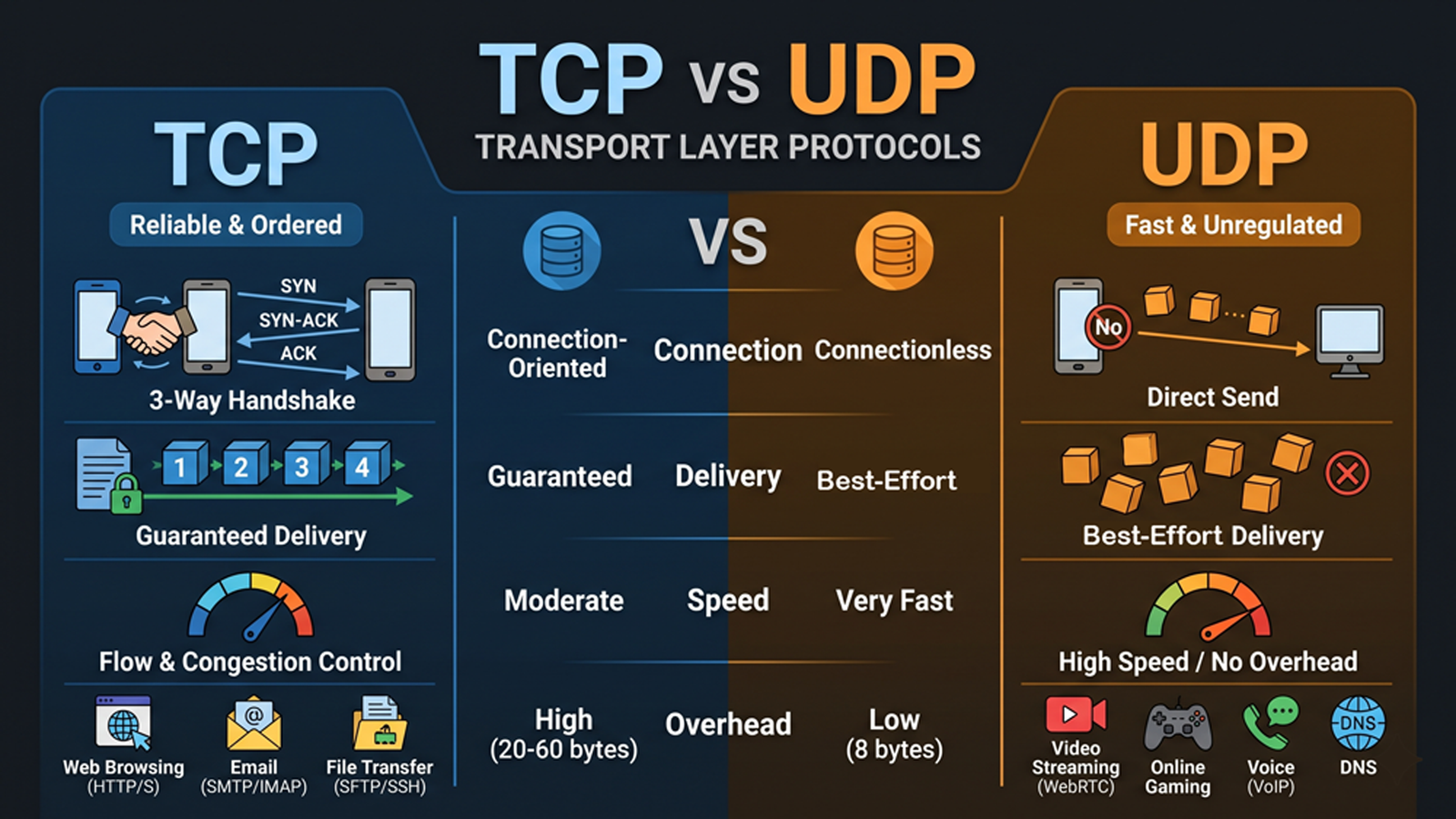
TCP and UDP both move application data between devices. They differ in how they deliver data and how much extra work they require.
Transmission Control Protocol (TCP)
TCP starts a connection with a three-way handshake (SYN, SYN-ACK, ACK). It delivers data as a reliable byte stream in the correct order. It uses sequence numbers and acknowledgments to track data. It also retransmits missing data and controls how much data is sent to avoid overwhelming the receiver or network.
Reliable delivery does not mean every transfer will succeed. A connection can still fail or time out.
User Datagram Protocol (UDP)
UDP sends separate datagrams without first setting up a connection. It does not include built-in acknowledgments, ordering, retransmissions, flow control, or congestion control. Its header is 8 bytes, compared with at least 20 bytes for TCP. Applications can add reliable delivery when needed. For example, QUIC uses UDP to provide secure, reliable data streams.
When to choose each
Choose TCP for SSH, SMTP, IMAP, SFTP, and HTTP/1.1 or HTTP/2 when data needs to arrive reliably and in order. UDP is used for DNS, real-time audio and video, some games, and QUIC/HTTP/3. UDP is not always faster than TCP. Performance depends on the application, the network, and how the protocol works.
2. Internet Layer: IPv4, IPv6, ARP, NDP, and NAT
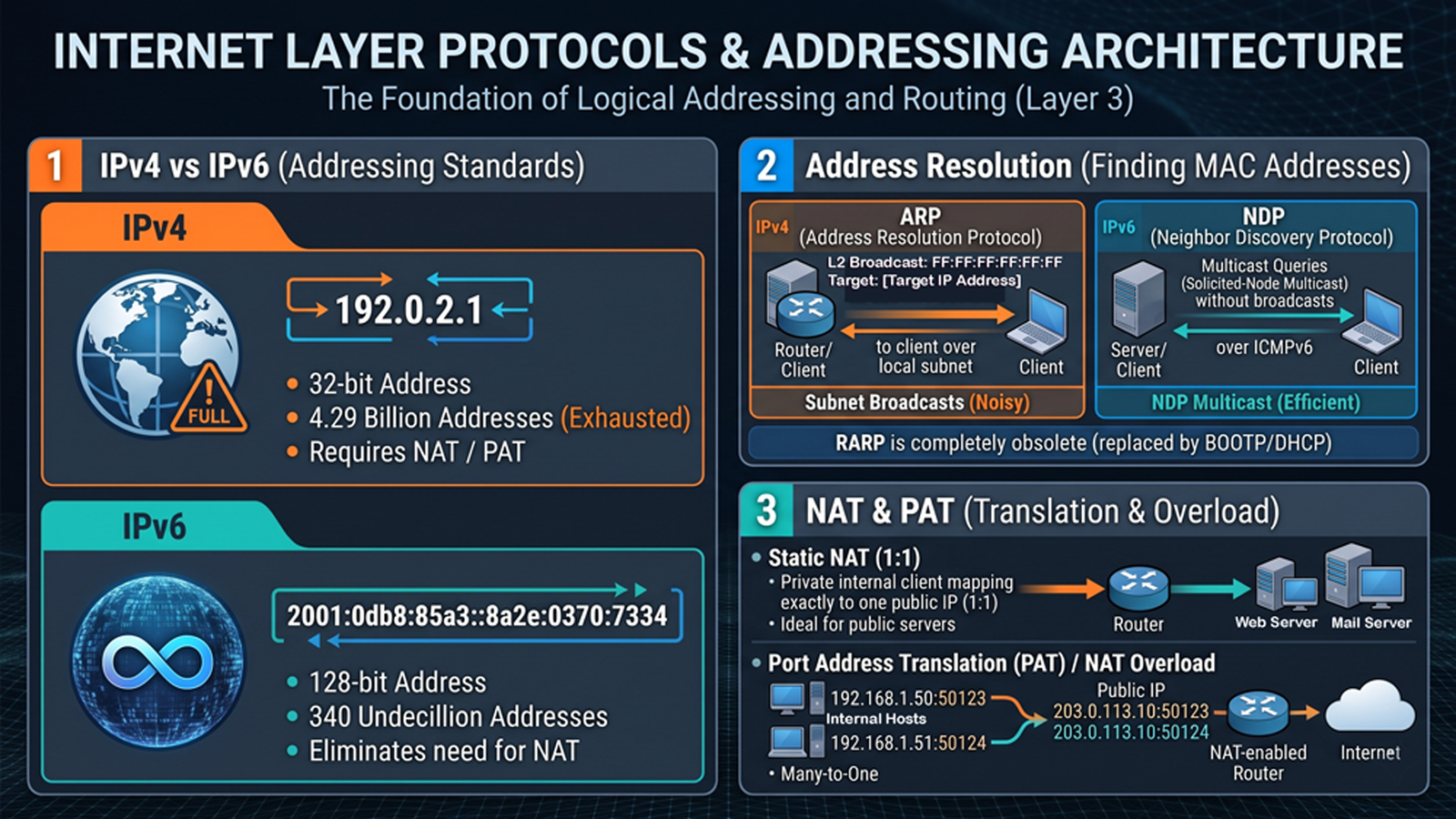
The Internet layer handles IP addresses and forwards packets between networks. IP makes its best effort to deliver packets, but it does not guarantee delivery.
IPv4 and IPv6
IPv4 uses 32-bit addresses, such as 192.0.2.1. That allows about 4.3 billion possible addresses. Public IPv4 addresses are limited, so networks often use CIDR and NAT. IPv6 uses 128-bit addresses, such as 2001:db8::1. It supports stateless address autoconfiguration (SLAAC) and has a fixed 40-byte base header. IPv6 does not need NAT to save addresses.
ARP and IPv6 Neighbor Discovery
On IPv4 networks, Address Resolution Protocol (ARP) maps an IPv4 address to a link-layer address on the local network. It sends broadcast requests. In contrast, IPv6 uses ICMPv6 Neighbor Discovery (ND/NDP) and solicited-node multicast. These help devices find neighbors, discover routers, and perform related tasks. Both methods work for local-network delivery. To reach another network, traffic goes to a next-hop router. Reverse ARP (RARP) is obsolete. It is replaced by BOOTP and DHCP for address configuration.
NAT and PAT
Static NAT usually maps one address to another with a fixed one-to-one mapping. Dynamic NAT assigns mappings from a pool of addresses. Port Address Translation (PAT) lets several internal devices share one public IPv4 address. It does this by changing IP addresses and transport-layer ports. NAT does not replace firewall rules or end-to-end encryption.
3. Network Diagnostics and Infrastructure Management
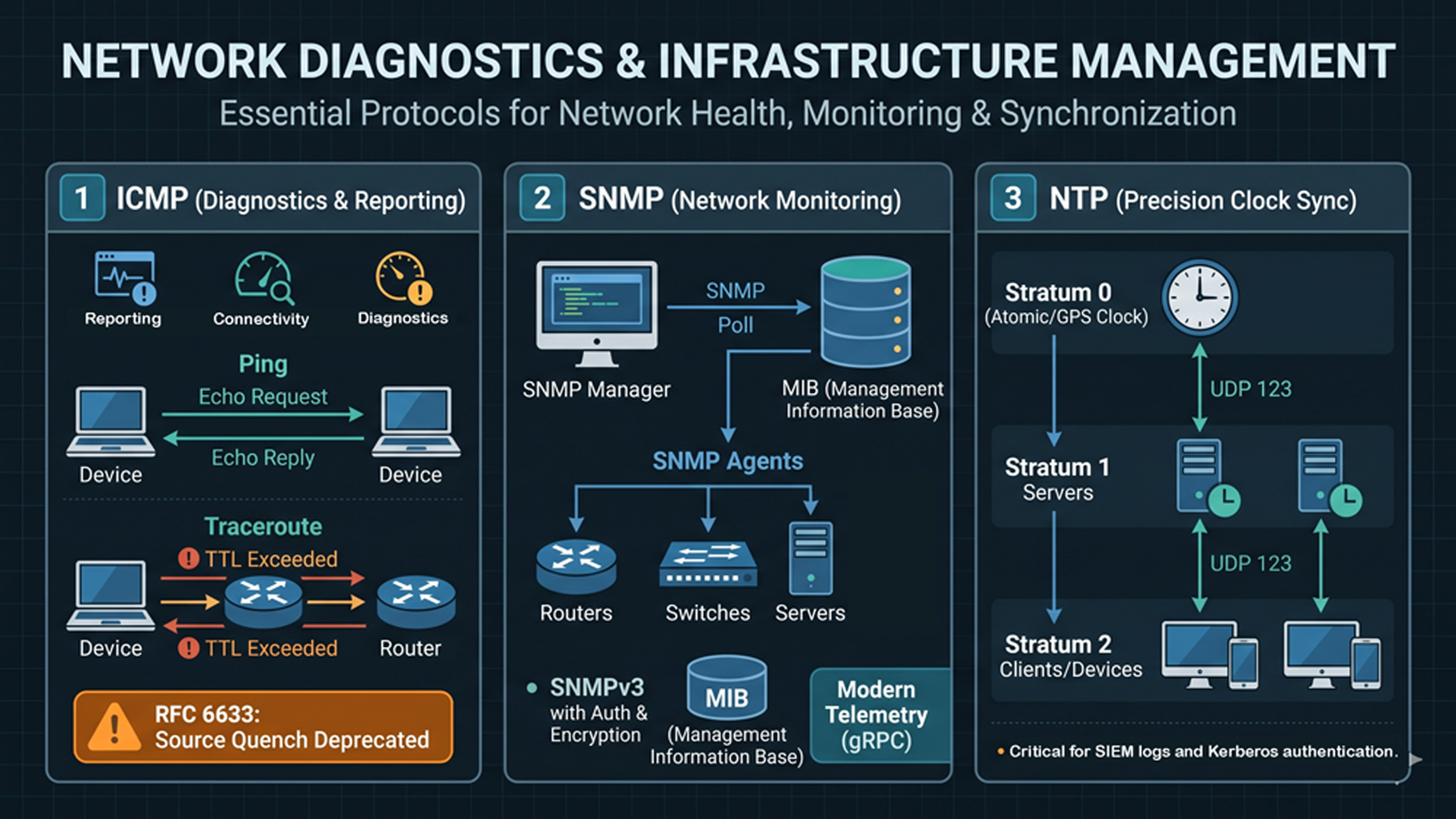
Diagnostic and management protocols help network teams find problems and monitor equipment. They also help keep clocks synchronized across devices.
ICMP and ICMPv6
ICMP carries error reports and diagnostic messages. The ping command usually sends Echo Request messages and receives Echo Reply messages. Traceroute can send UDP, ICMP, or TCP probes. It uses Time Exceeded replies from routers along the path. ICMPv4 "Fragmentation Needed" and ICMPv6 "Packet Too Big" messages help with Path MTU Discovery. ICMP Source Quench is deprecated under RFC 6633. It must not be used to control congestion.
SNMP and streaming telemetry
Simple Network Management Protocol (SNMP) lets monitoring tools read managed objects. These objects have identifiers called OIDs and are described in management information bases (MIBs). Use SNMPv3 with strong authentication and privacy protection when possible. Avoid the cleartext community-string security used by SNMPv1 and SNMPv2c. Modern networks may also use streaming telemetry through gNMI/gRPC or other transports. Support depends on the device.
NTP clock synchronization
Network Time Protocol (NTP) usually uses UDP port 123. Reference clocks are known as stratum 0. Servers connected directly to them are stratum 1. Other servers fall into later strata. Accurate clocks help teams match events, support authentication, and troubleshoot problems. When stronger protection is needed, consider authenticated time synchronization such as Network Time Security (NTS).
4. DNS, HTTP, HTTPS, and HTTP/3
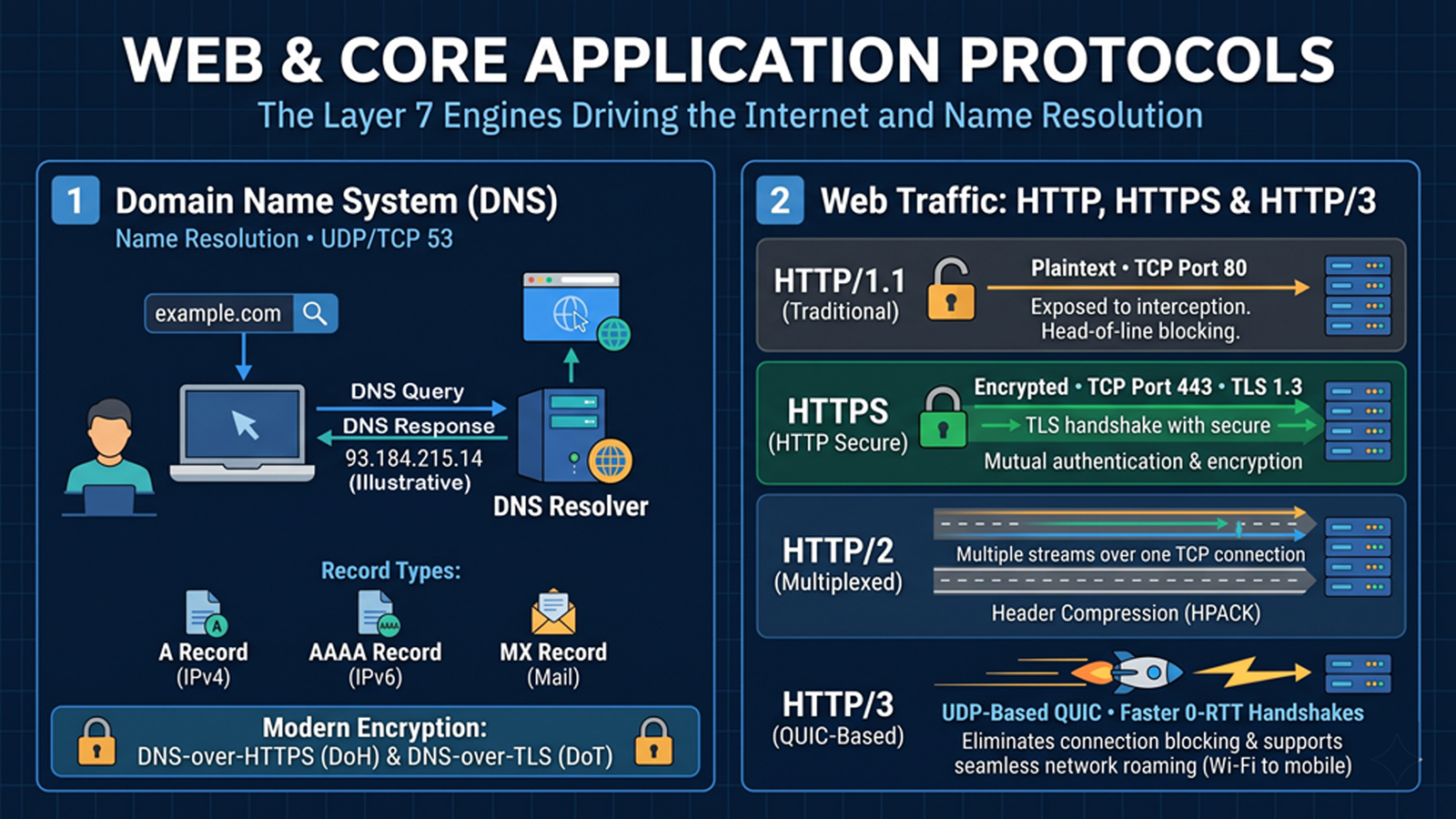
DNS helps find names and publishes other types of resource records. HTTP sets the rules for requests and responses between web browsers and servers.
Domain Name System (DNS)
DNS A records contain IPv4 addresses. AAAA records contain IPv6 addresses. MX records identify mail servers. Standard DNS usually uses UDP or TCP port 53. TCP is not used only for zone transfers or replies larger than 512 bytes. EDNS(0) also allows larger UDP messages. DNS-over-TLS (DoT) and DNS-over-HTTPS (DoH) encrypt the connection to a DNS resolver. They do not prove that DNS records came from the right source. DNSSEC provides checks for record origin and integrity.
HTTP/1.1, HTTPS, and HTTP/2
HTTP/1.1 can use TCP with unencrypted HTTP, usually on port 80. It can also use TLS as HTTPS, usually on port 443. HTTPS encrypts data in transit and normally checks the server’s identity with a certificate. Client certificates are optional. HTTP/2 adds binary framing, multiplexing, and HPACK header compression. Its streams still use the same TCP connection. As a result, TCP packet loss can affect every stream on that connection.
HTTP/3 over QUIC
HTTP/3 runs on QUIC over UDP, usually on port 443. QUIC includes TLS 1.3. It avoids TCP-level head-of-line blocking between separate QUIC streams. It can also let a connection move between networks. The 0-RTT feature is optional and works only for eligible resumed sessions. It needs special care because requests may be replayed. It is not available on every connection.
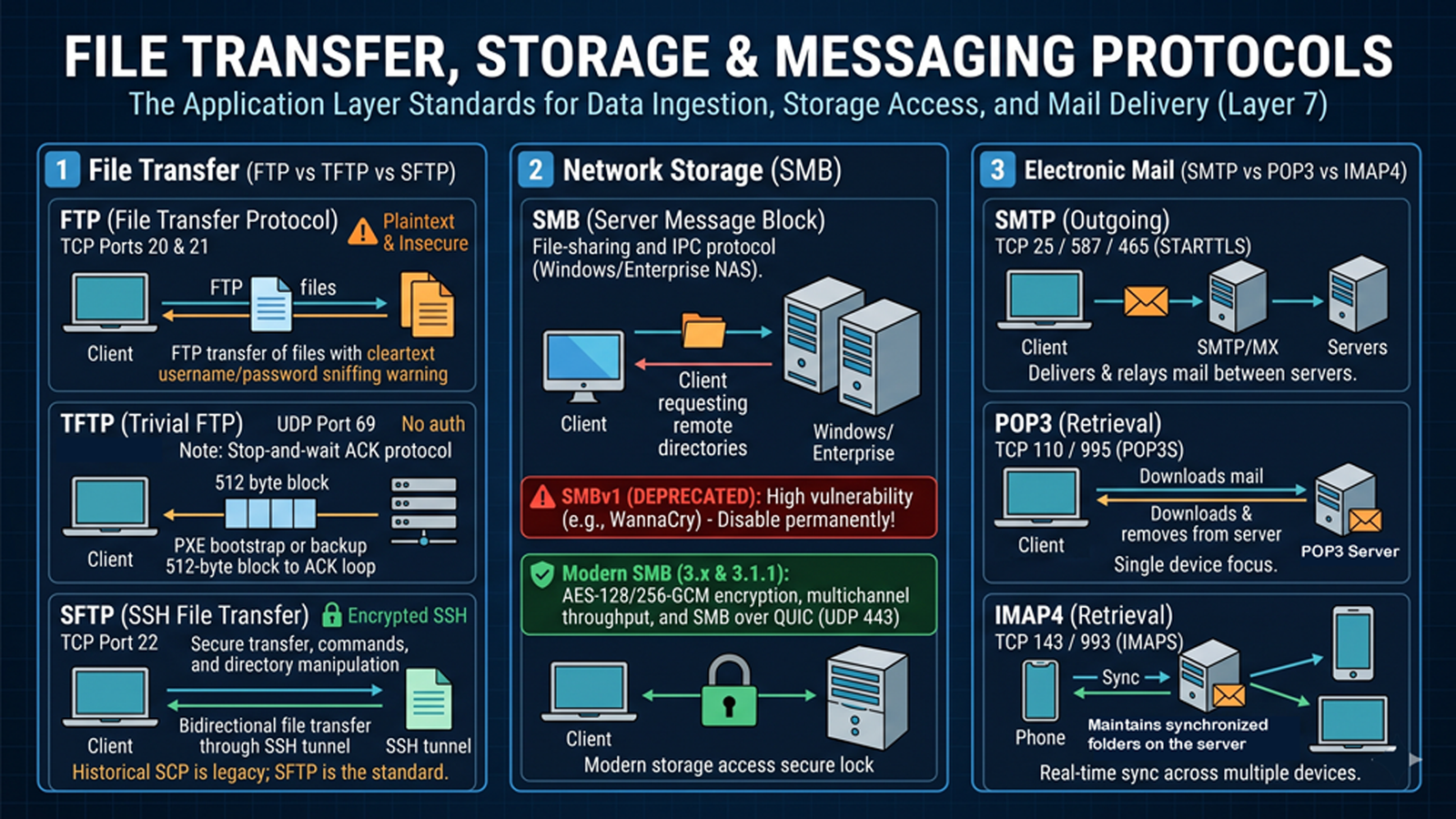
5. File Transfer, Storage, and Email Protocols
Choose file and email protocols based on security, compatibility, and whether files or messages need to stay in sync.
FTP, FTPS, TFTP, SCP, and SFTP
FTP uses TCP port 21 for control. In active mode, data often uses the server’s port 20. Passive mode uses ports negotiated during the session. Standard FTP does not protect credentials or content. FTPS adds TLS for security. TFTP starts transfers on UDP port 69. It then uses negotiated transfer identifiers (UDP ports) for the remaining traffic. It supports acknowledgments and retransmissions but has no built-in authentication or encryption. The traditional TFTP block size is 512 bytes, although extensions can negotiate other sizes. SFTP is part of SSH and usually uses TCP port 22. It is different from FTPS. SCP is still the name of a command and tool. Modern OpenSSH scp normally uses SFTP by default, but the older SCP protocol mode may still be available.
SMB file sharing
Server Message Block (SMB) supports network file sharing and related services. It usually uses TCP port 445. Disable SMBv1 wherever possible. SMB 3.x supports encryption and multichannel, among other features. Whether encryption is used depends on the settings and features agreed on by both sides. SMB over QUIC offers encrypted remote access on supported platforms. It usually uses UDP port 443.
SMTP, POP3, and IMAP
SMTP sends and relays email. Servers commonly use TCP port 25 to exchange mail. Clients often use TCP port 587 to submit mail with STARTTLS when it is supported or required. TCP port 465 is used for submission with TLS from the start. POP3 usually uses TCP port 110 or port 995 with TLS. Whether downloaded messages stay on the server depends on the email client settings. IMAP usually uses TCP port 143 or port 993 with TLS from the start. It keeps mailboxes synchronized across devices. Protect email connections with TLS and suitable authentication.
6. Remote Access, Directory Services, and Multicast
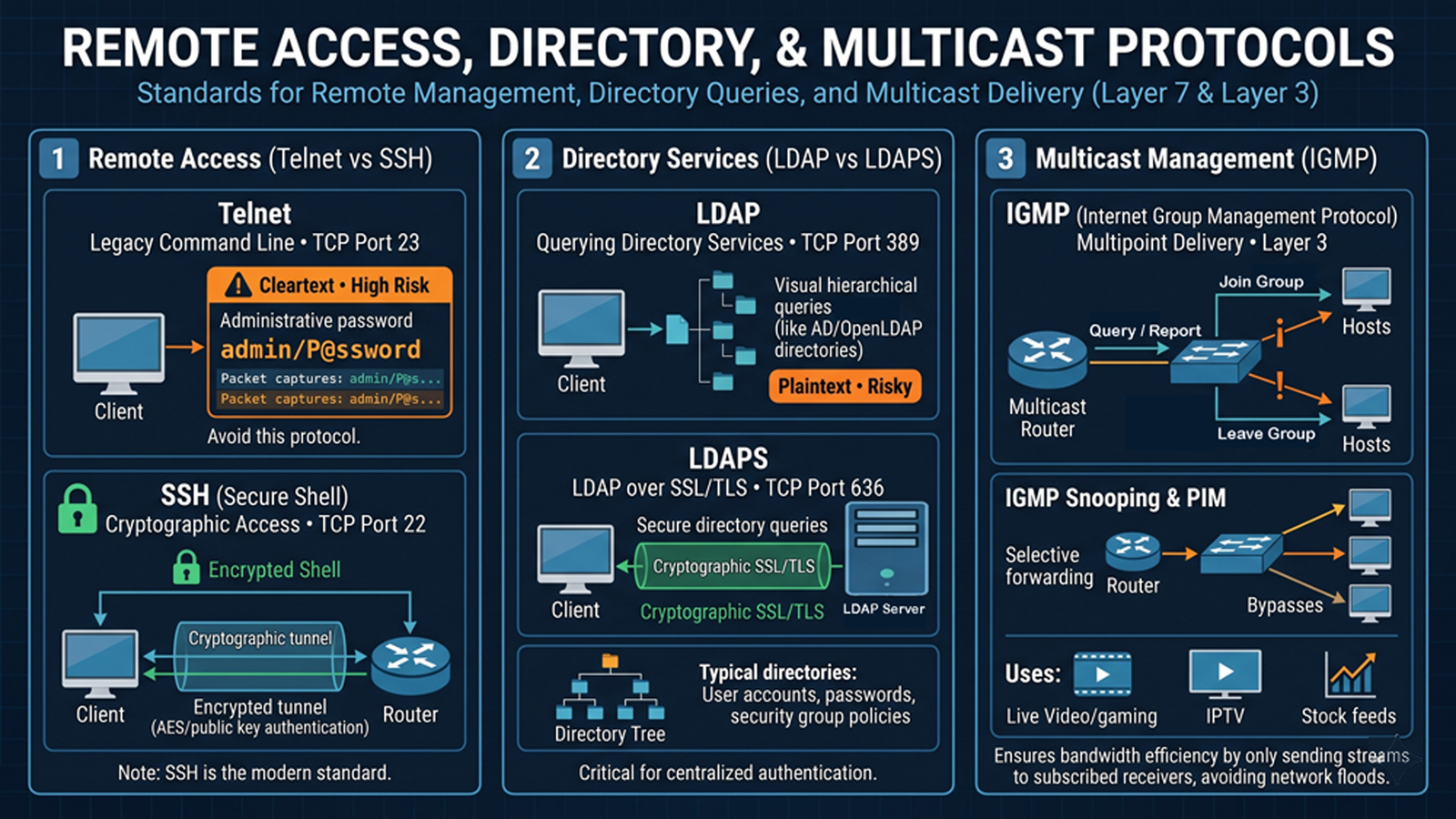
Remote administration, directory searches, and multicast group management do different jobs. Each needs its own security measures.
Telnet versus SSH
Telnet usually uses TCP port 23. It has no built-in encryption, so it should not be used to manage devices over untrusted networks. SSH usually uses TCP port 22. It encrypts remote shell sessions, tunnels, and SFTP connections. It also authenticates the server. Choose modern key-based authentication, limit access, and keep cryptographic algorithms up to date.
LDAP, StartTLS, and LDAPS
LDAP usually uses TCP port 389. Its traffic may be unencrypted unless StartTLS is used. LDAPS usually uses TCP port 636 and starts with TLS already enabled. Both can be secure when TLS is set up correctly and certificates are checked. LDAP lets applications search and update directory entries. It does not automatically encrypt every directory connection or stored password.
IGMP and IPv6 MLD
Internet Group Management Protocol (IGMP) manages IPv4 multicast group membership between devices and nearby routers. IGMP snooping helps Ethernet switches send multicast traffic only where it is needed. Protocol Independent Multicast (PIM) helps route multicast traffic. IPv6 uses Multicast Listener Discovery (MLD) instead of IGMP. Joining a multicast group does not always save bandwidth. It also does not limit traffic to authenticated viewers.
7. Network Printing: LPD/LPR vs. IPP/IPPS
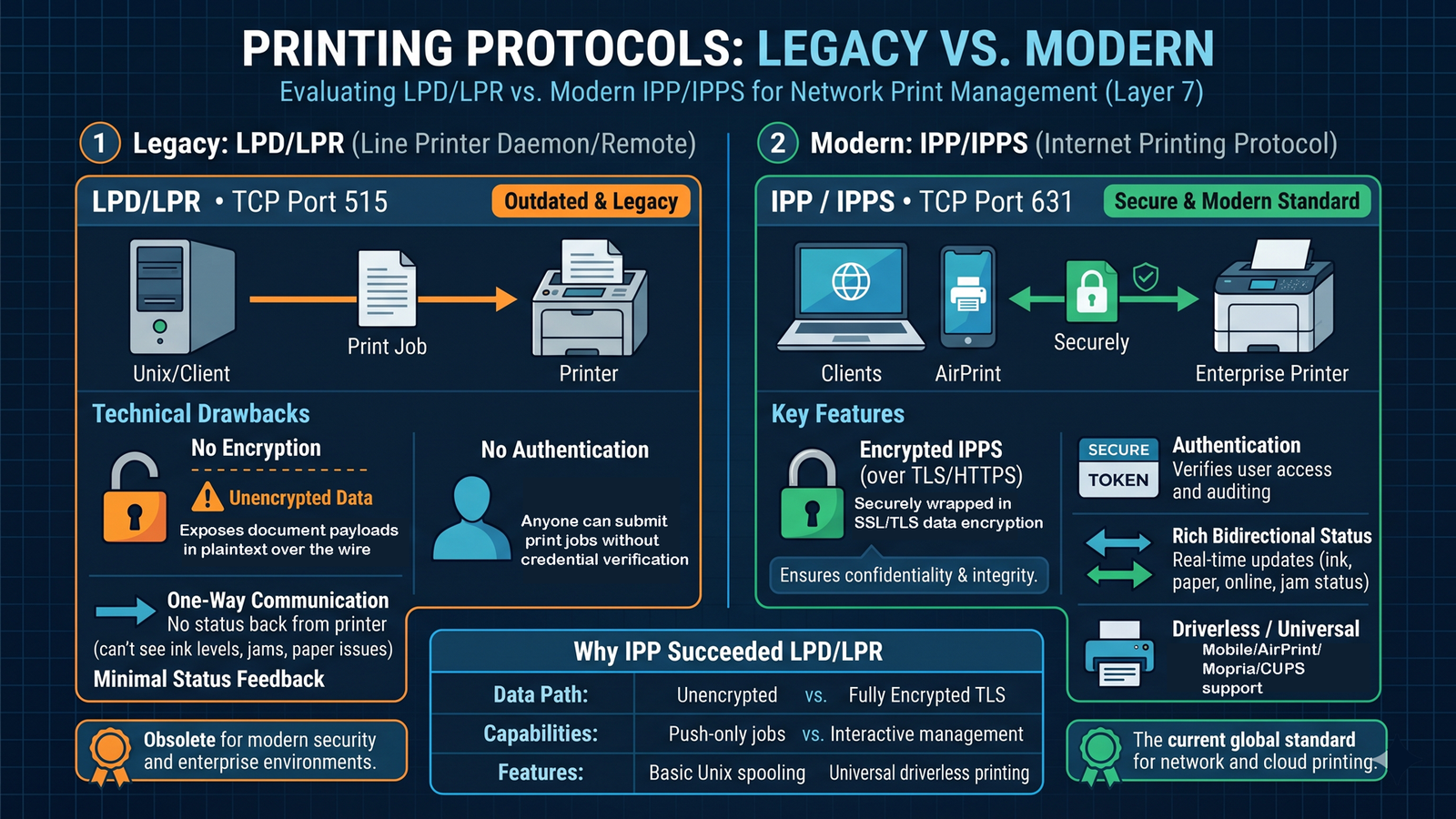
Network printing has moved beyond simple job submission. Modern protocols can also help devices discover printers, check printer features, report status, and protect traffic.
Legacy LPD/LPR
The Line Printer Daemon/Line Printer Remote (LPD/LPR) family usually uses TCP port 515. Traditional LPD/LPR has no built-in transport encryption or strong standardized authentication. It also provides fewer status features than modern IPP. Some older printers and compatibility setups still use it.
Modern IPP and IPPS
Internet Printing Protocol (IPP) usually uses TCP port 631. It supports print jobs, printer settings and features, and status checks. IPP does not automatically encrypt traffic. IPPS uses HTTPS/TLS, usually on port 631, to protect data in transit. Authentication and access controls depend on the printer and server settings. IPP is the basis for driverless printing systems such as IPP Everywhere and many AirPrint implementations.
Deployment recommendation
Use IPPS with validated certificates, access controls, and updated printer firmware whenever possible. Keep older LPD/LPR systems on controlled networks when they cannot be replaced.
Common Network Protocol Ports: Quick Reference
| Protocol | Default port / transport | Security or usage note |
|---|---|---|
| DNS | 53 UDP/TCP | DoT typically uses 853/TCP. DoH commonly uses 443/TCP or QUIC. |
| HTTP / HTTPS | 80/TCP and 443/TCP | HTTP/3 typically 443/UDP |
| SSH / SFTP | 22/TCP | Encrypted SSH transport |
| Telnet | 23/TCP | Unencrypted. Avoid it for administration. |
| FTP / FTPS | 21/TCP and 990/TCP for implicit FTPS | Data channels use additional ports |
| TFTP | 69/UDP (initial request) | Transfer uses additional UDP ports |
| SMTP | 25, 587, 465/TCP | 465 uses implicit TLS. 587 uses submission/STARTTLS. |
| POP3 / IMAP | 110/995 and 143/993 TCP | 995 and 993 use implicit TLS |
| SMB | 445/TCP | SMB over QUIC commonly 443/UDP |
| LDAP / LDAPS | 389/636 TCP | 389 may use StartTLS |
| SNMP | 161/162 UDP | 162 commonly receives traps/informs |
| NTP | 123/UDP | Clock synchronization |
| LPD/LPR / IPP | 515/631 TCP | IPPS uses TLS on 631 |
Conclusion: Choose Protocols for Reliability, Security, and Compatibility
No single network protocol is right for every job. TCP provides reliable data delivery in order. UDP sends lightweight datagrams. QUIC adds secure, modern transport over UDP. IPv6 provides far more addresses. DNS, ICMP, SNMP, and NTP help people find, monitor, and manage networks. For applications, HTTPS, SSH, SFTP, email protected by TLS, and IPPS are usually better choices than older unencrypted protocols. For production networks, use supported protocol versions and authenticated encryption. Set suitable access controls and keep monitoring your systems. Check the port requirements and security features in the documentation for the exact software and devices you use.
Author Laxmi Goswami Updated on 2026-11-14