How DHCP works Explained with Examples
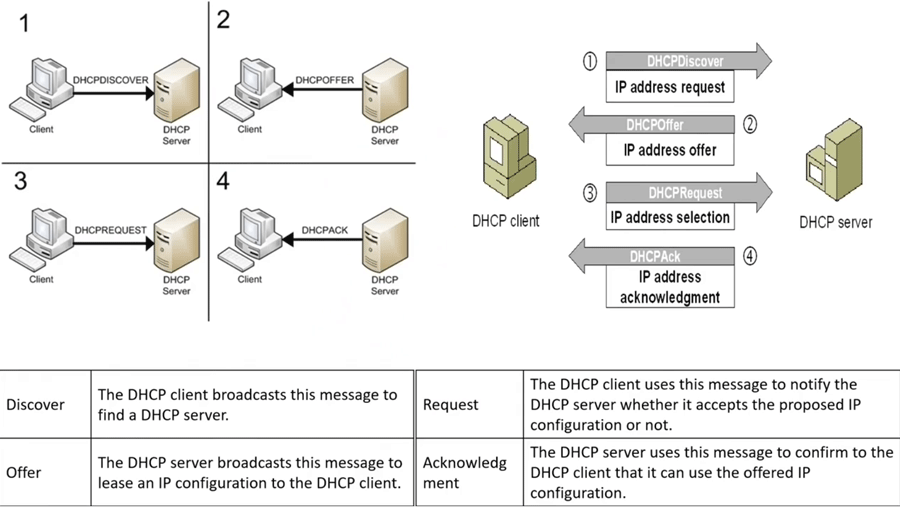
A DHCP client obtains an IP address and related configuration information from a DHCP server. For this, it sends a DHCP request message on the network. If a DHCP server is available on the network, it receives the DHCP request message and, in reply, provides an IP configuration to the DHCP client. This process goes through four steps: Discover, Offer, Request, and Acknowledgement. This tutorial explains these steps through an example.
Video version
A video version of this tutorial is also available on our YouTube channel. Please refer to the following link to access the video.
DHCP Processes and Stages (Discover, Offer, Request, and Acknowledgment) Explained
Example
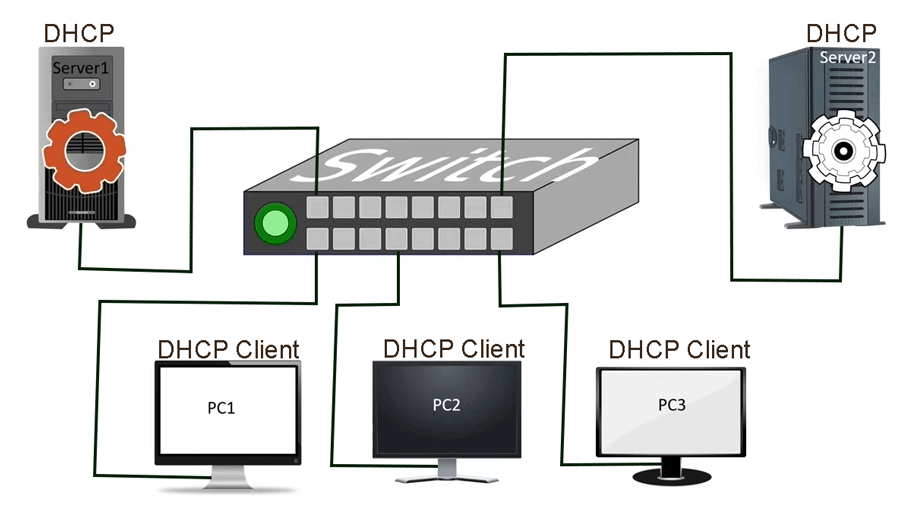
A network has three computers and two servers. All computers are configured as DHCP clients, and the DHCP service is running on both servers.
DHCP discover
When a computer is powered on, it first checks for a valid IP address. If none is found, it generates a DHCP discover message and sends it on the local network. In this message, the source and destination addresses are set to 0.0.0.0 and 255.255.255.255, respectively.
0.0.0.0 is a placeholder IP address. Any device lacking a valid source address can use this address in the source address field to send a message. It is a generic network address. The destination device cannot identify the source address from this address. It is a source-only address. The destination device cannot reply to this address. However, if required, it can use this address in the source address field. 255.255.255.255 is a broadcast address. All devices listen to this address. Any device, regardless of its current IP configuration, can use these addresses to send and receive messages within the local network.
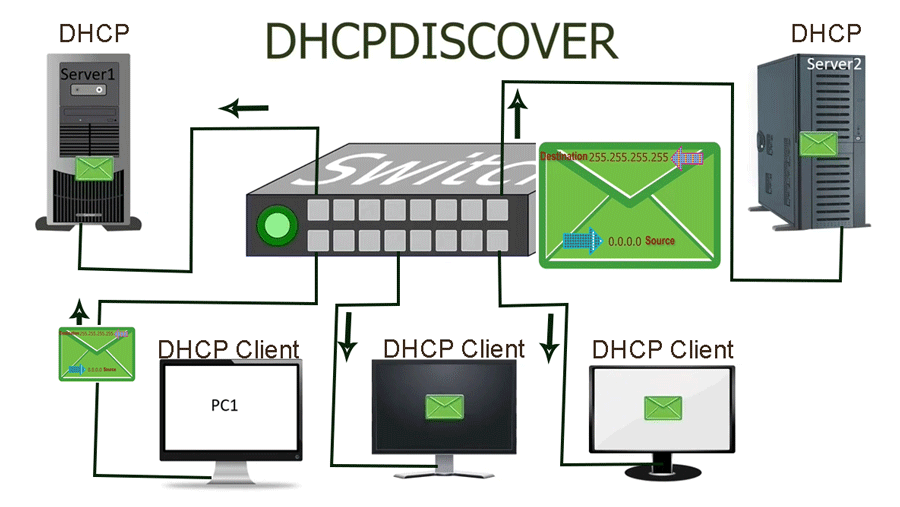
Since a DHCP client does not have a valid IP configuration at the initial stage, it uses these addresses to send a DHCP discover message on the local network. All DHCP servers available on the network receive this message.
DHCP offer
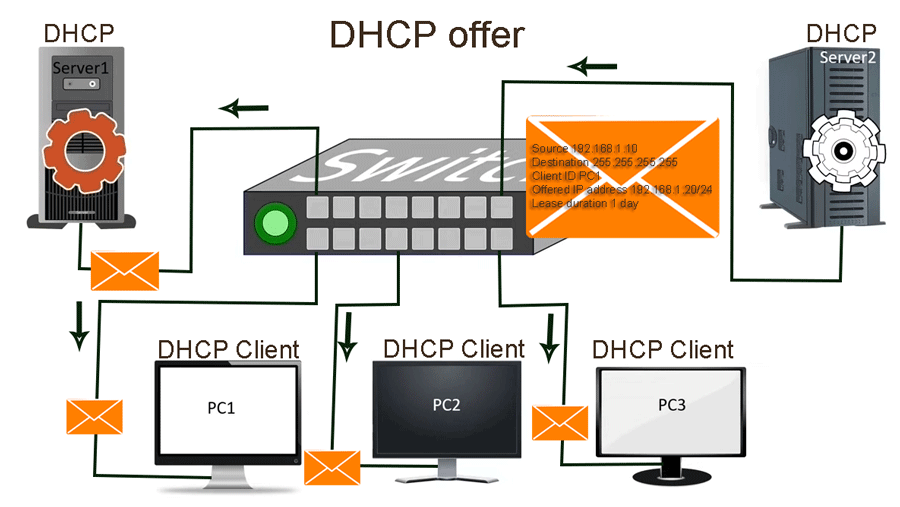
A DHCP server accepts and processes all incoming DHCP discover messages. A DHCP discover message includes the client's MAC address. The DHCP server uses it to assign and track IP configurations. Multiple DHCP servers may respond to the discover message. In response, each DHCP server sends a DHCP offer message.
Since a DHCP discover message contains a source-only generic placeholder IP address in the source address field, the DHCP server cannot send the DHCP offer message directly to the DHCP client. It sends the DHCP offer message to the local broadcast address (255.255.255.255). In the source address field, it uses its IP address. The DHCP offer message reaches all devices on the network.
A DHCP offer message includes the proposed IP configuration along with protocol-specific information, such as the lease duration and the client's MAC address in the client ID field. An IP configuration typically includes the client's IP address, subnet mask, default gateway address, and DNS server address.
DHCP request
All devices on the local network receive the DHCP offer message and examine the client ID field. If a device sees its own MAC address, it treats the message as intended for itself; otherwise, it disregards it. The host that initiated the DHCP discover message accepts the DHCP offer. If multiple DHCP servers are present, the host may receive several DHCP offer messages but will accept only one. The host then notifies the corresponding DHCP server of its selection by sending a DHCP request message.
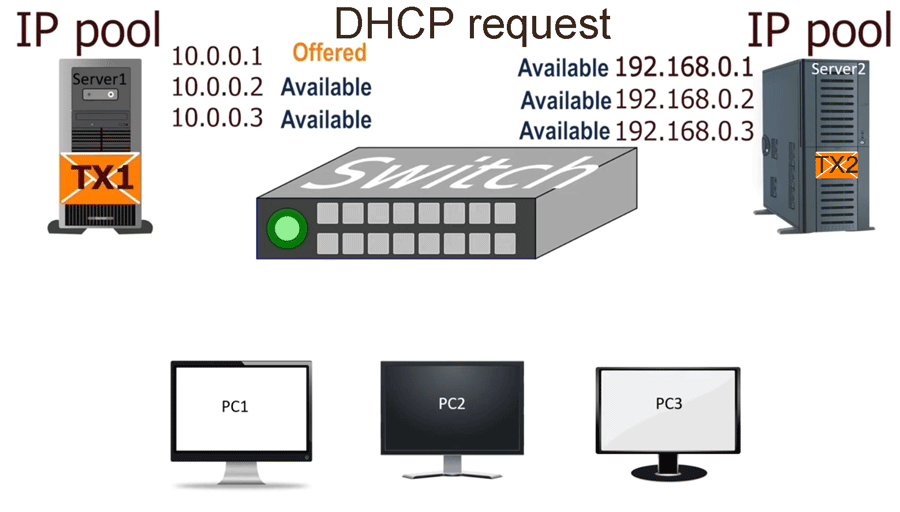
The DHCP server includes a unique transaction ID in its offer message. The DHCP client includes this ID in the DHCP request message it sends in reply to the DHCP offer message. All available DHCP servers on the local network receive the DHCP request message. If a DHCP server sees its transaction ID in the message, it assumes the client has accepted its offer. If it finds a transaction ID that does not belong to it, it assumes that the client rejected its offer message.
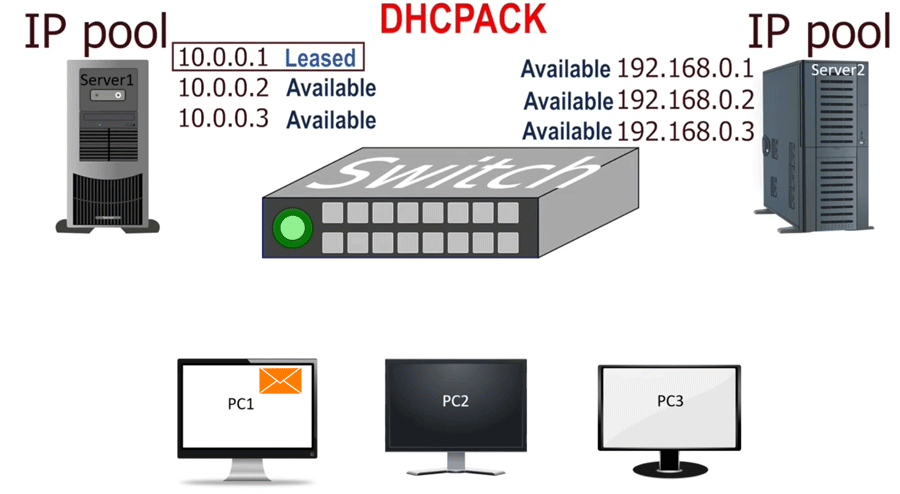
All servers, except the one whose offer was accepted, withdraw their offers and return their IP addresses to the available pool. For example, Server 1 may offer the IP address 10.0.0.1 with transaction ID TX1, while Server 2 offers 192.168.0.1 with transaction ID TX2. The client accepts the offer from the first server and sends a DHCP request message to acknowledge it. Upon receiving this message, both servers examine the transaction ID and MAC address fields to determine the outcome. Server 1 recognizes its transaction ID and confirms acceptance, adding the offered IP address to its list of assigned addresses. Server 2 and any other servers, upon seeing Server 1's transaction ID, return their offered IP addresses to the available pool.
DHCP acknowledgement
When the DHCP server receives the DHCP request message from the DHCP client, the process reaches its final step. The DHCP server sends a DHCPACK message to the DHCP client. The DHCPACK message acknowledges the DHCP request message and authorizes the DHCP client to use the offered IP configuration. The DHCP client can use the offered IP address until its lease expires. After that, it has to re-obtain the IP configuration.
Summary
Obtaining an IP configuration from a DHCP server involves four stages: discover, offer, request, and acknowledgement. In the first stage, the client broadcasts a DHCP discovery message to locate a DHCP server. In the second stage, the DHCP server responds to the discovery message with a DHCP offer message, which includes the proposed lease duration and the client's MAC address. In the third stage, the client accepts the offered IP configuration and notifies the server by sending a DHCP request message. In the fourth and final stage, the DHCP server acknowledges the client's request.
This tutorial is part of the tutorial series "DHCP (Dynamic Host Configuration Protocol) basic concepts, configurations, functions, and options explained". Other parts of this series are the following.
Chapter 1 What DHCP is and Types of DHCP Explained
Chapter 2 How DHCP works explained with examples
Chapter 3 DHCP Configuration Parameters and Settings Explained
Chapter 4 How to Configure DHCP Server on Cisco Switches
Chapter 5 Configure DHCP Server for multiple VLANs on the Switch
Chapter 6 How to Configure DHCP Server on Cisco Routers
Chapter 7 How DHCP Relay Agents work Explained
Chapter 8 How to Configure DHCP Relay Agent on Cisco Routers
Chapter 9 How DHCP Snooping works Explained
Chapter 10 Configure DHCP Snooping on Cisco Switches
Conclusion
Understanding DHCP's methods and processes is essential for automating IP configuration assignment and renewal, reducing administrative overhead, minimizing configuration errors, and maintaining scalable, reliable, and secure network systems. This tutorial explained how DHCP servers offer IP configurations to DHCP clients.
Author Laxmi Goswami Updated on 2026-02-09