VTP Modes and VTP Protocol Explained
VTP is a Cisco proprietary VLAN management protocol. It allows you to manage VLANs from a centralized switch. It works in three modes: Server, Transparent, and Client. This tutorial explains this protocol and these modes in detail.
In a small network, you can manually manage VLANs. For example, if your network has only two switches and you want to add a new VLAN, you can easily add that VLAN to both switches. But if your network has 50 switches, this process becomes complex and tedious. You might make a mistake in configuring the new VLAN or forget to add the new VLAN to one of these switches.
VTP solves this issue. It allows you to manage VLAN information from a single switch. With it, you need to add or remove VLAN information only on the VTP Server. VTP Server automatically propagates the new VLAN information, via VTP messages, to all of the other switches in the network. VTP shares VLAN configuration information between Cisco switches on trunk connections. It allows switches to share and synchronize their VLAN information, ensuring the network has a consistent VLAN configuration.
VTP domains
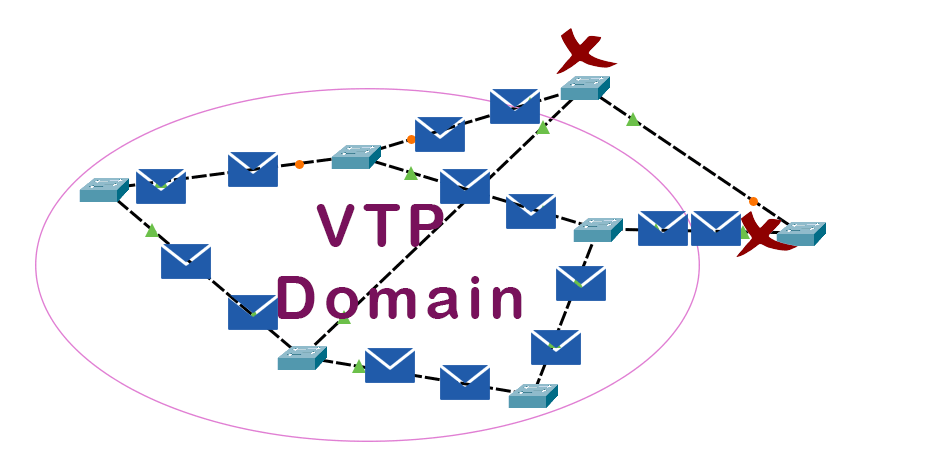
A VTP domain is a group of switches that share VTP information. For example, you have 50 switches in a network. You want only 30 of them to share VTP information. In that case, you can keep them in a VTP domain. If a switch is not a member of a VTP domain, it ignores VTP messages shared in that domain.
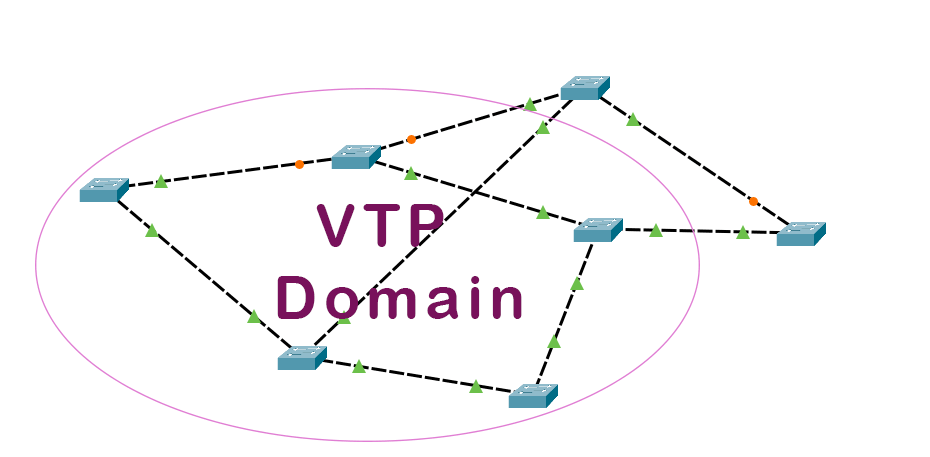
A switch can belong only to a single domain. When switches generate VTP messages, they include the domain name in their messages. A switch processes incoming VTP messages only when the domain name in the message and the domain name configured on it are the same.
VTP modes
There are three VTP modes: Server, Transparent, and Client. Based on the mode you configure on a switch, the switch interacts with VLANs.
VTP Server mode
This mode allows you to add, modify, and delete VLANs. It automatically propagates VLAN information to other switches. You can configure multiple VTP Server switches in a VTP domain. If a VTP server receives VLAN information from another VTP server in the same VTP domain, it compares the received information with the locally saved information and keeps the updated information. To compare information, it uses the configuration revision number. VTP Server adds a configuration revision number to each VLAN information it advertises through VTP messages.
Initially, this number is zero (0). When you make a change on a server switch, it increments its revision number and advertises this to the other switches. When a client or other server switch receives this information, it compares the revision number in the message to the last message it received. If the newly arrived message has a higher number, it assumes that the VLAN information on the Server has changed and updates the locally stored information from the received message. If the message has the same revision number, it ignores the message.
VTP Client mode
In this mode, a switch depends on the VTP Server for VLAN information. It can not make any change in the VLAN information itself. It incorporates VTP messages received from the VTP Server and implements the VLANs as specified in the VTP messages.
VTP Transparent mode
In this mode, a switch works as a bridge between the VTP Server and the VTP clients. It connects VTP Servers with VTP clients. It forwards the messages it receives from the VTP Server to the VTP clients. It does not change or incorporate VTP messages. You can add, modify, and delete VLAN on a transparent switch. But these changes are locally significant. It does not forward them to other switches.
Differences between VTP modes
The following table lists the differences between VTP Server, transparent, and client modes.
| Criteria | VTP Server | VTP client | VTP Transparent |
| Add, modify, and delete VLANs | Yes | No | Yes |
| Generate VTP messages | Yes | No | No |
| Propagate VTP messages | Yes | Yes | Yes |
| Accept changes in a VTP message | Yes | Yes | No |
| Default VTP mode | Yes | No | No |
| Save VLANs to NVRAM | Yes | No | Yes |
This tutorial is part of the tutorial VLAN, VTP, and DTP Concepts and Configurations on Cisco Routers.. Other parts of this tutorial are as follows:
Chapter 01 VLAN Basic Concepts Explained with Examples
Chapter 02 Advantages and Disadvantages of VLANs
Chapter 03 Static and Dynamic VLAN Membership Explained
Chapter 04 Access Link and Trunk Link Explained
Chapter 05 VLAN Tagging Explained with DTP Protocol
Chapter 06 DTP Modes and Protocol Explained
Chapter 07 802.1Q Native VLAN concept Explained
Chapter 08 Cisco Inter-Switch Link (ISL) Explained
Chapter 09 Trunk Tagging and Frame Tagging Explained
Chapter 10 VTP Modes and VTP Protocol Explained
Chapter 11 VTP Pruning on switches Explained
Chapter 12 VLAN Practice Lab Setup in Packet Tracer
Chapter 13 Configure VTP Server and Client in Switch
Chapter 14 VLAN Configuration Commands Step by Step Explained
Chapter 15 Router on Stick Configuration Explained
Conclusion
VTP protocol allows you to dynamically manage VLANs on multiple switches. It works in three modes: Server, Client, and Transparent. The Server mode allows you to create VLANs. It automatically propagates VLAN information across the switches. Client receives VLAN information from the Server. In Transparent mode, it only passes the VLAN information.
Author Laxmi Goswami Updated on 2026-04-18