VLAN Basic Concepts Explained with Examples
A VLAN is a logical grouping of network resources connected to administratively defined ports on a switch. VLANs break a large broadcast domain into smaller broadcast domains. Each VLAN creates a separate broadcast domain.
Basic concepts and fundamentals of VLANs
A LAN is a group of devices connected to a single Ethernet network. A broadcast message is a message that reaches all devices in the LAN network. Devices use broadcast messages to perform many essential tasks. The more devices you add to a network, the more broadcast messages it will have. Broadcast messages reduce network performance. To improve network performance, administrators break the LAN network into smaller LANs. When you break a large LAN into smaller LANs, you create VLANs. VLANs are smaller LANs. VLANs create a boundary for broadcast messages. A broadcast message generated in a VLAN reaches all devices inside the VLAN. It does not go outside the VLAN. If two devices belong to different VLANs, they do not exchange broadcast messages.
How VLANs work
A switch does not understand broadcast messages. When it receives a broadcast message on one of its ports, it forwards that message from remaining ports. Let us take an example. Suppose an 8-port switch receives a broadcast message on port 1. It forwards the message from port 2 to 8.

A VLAN is a switch-only feature. It allows us to define ports that share broadcast messages. If two switch ports belong to different VLANs, they do not share broadcast messages. If two ports belong to the same VLAN, they share broadcast messages.
Let us take the preceding example. Create two VLANs: VLAN-10 and VLAN-20 on the switch. Assign ports 1 to 4 to VLAN-10 and ports 5 to 8 to VLAN-20. After this, ports 1, 2, 3, and 4 will share broadcast in VLAN-10, and ports 5, 6, 7, and 8 will share broadcast in VLAN-20.

VLANs are not limited to a standalone switch. You can create and use them across multiple switches. This feature allows you to organize your network logically. Let us take one more example to understand this feature. A network has three segments. Backlinks connect all segments. Each segment has four PCs.
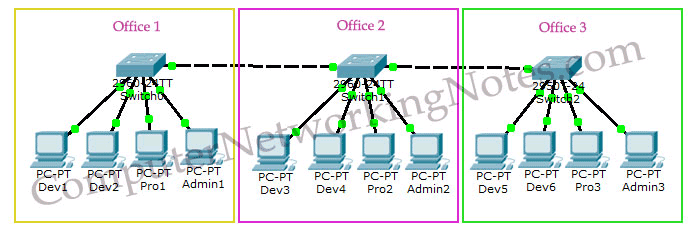
Suppose you want to break this network into three sections: Development, Production, and Administration. In the Development section, you want to keep six computers, two computers from each segment. In the production section, you want to put three computers, one computer from each segment. You have a similar requirement for the administration section, one computer from each segment. In this situation, you can use VLANs. VLANs allow you to create logical groups of devices. You can create three VLANs, one for each section. You need to make these VLANs on all switches. After creating VLANs, you can add computers to their respective VLANs. VLANs are similar to network segments. Devices in different VLANs cannot communicate directly. You need to connect them through a router.
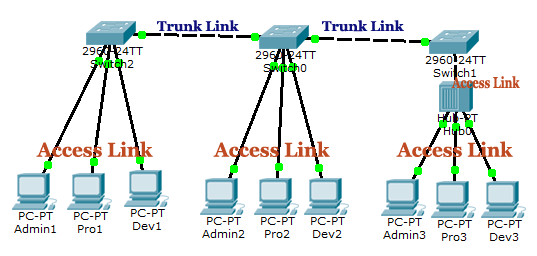
Key points: -
- VLANs are a switch-only feature. It works only on manageable Ethernet switches.
- VLANs create boundaries for broadcast messages.
- VLANs do not share broadcast messages.
- Devices in different VLANs cannot communicate directly. They can communicate through a router.
- You can create and use the same VLAN on multiple routers. This feature allows you to arrange devices logically.
- All switches have a default VLAN, called VLAN1.
- By default, all switch ports belong to VLAN1.
This tutorial is part of the tutorial VLAN, VTP, and DTP Concepts and Configurations on Cisco Routers.. Other parts of this tutorial are as follows:
Chapter 01 VLAN Basic Concepts Explained with Examples
Chapter 02 Advantages and Disadvantages of VLANs
Chapter 03 Static and Dynamic VLAN Membership Explained
Chapter 04 Access Link and Trunk Link Explained
Chapter 05 VLAN Tagging Explained with DTP Protocol
Chapter 06 DTP Modes and Protocol Explained
Chapter 07 802.1Q Native VLAN concept Explained
Chapter 08 Cisco Inter-Switch Link (ISL) Explained
Chapter 09 Trunk Tagging and Frame Tagging Explained
Chapter 10 VTP Modes and VTP Protocol Explained
Chapter 11 VTP Pruning on switches Explained
Chapter 12 VLAN Practice Lab Setup in Packet Tracer
Chapter 13 Configure VTP Server and Client in Switch
Chapter 14 VLAN Configuration Commands Step by Step Explained
Chapter 15 Router on Stick Configuration Explained
Conclusion
This tutorial introduced the VLAN concept. It explained what VLANs are and why administrators use them in networks. It also described how VLANs work and presented an example of it. Learning these essential things helps you understand the VLAN concept.
Author Laxmi Goswami Updated on 2026-04-15