HDLC Protocol and Encapsulation method Explained
The HDLC protocol, developed by ISO (the organization behind the OSI model), specifies a data encapsulation method for serial links using frame characters and checksums. It was designed for point-to-point leased lines, where data sent from one end travels directly to the other.
Since there is no intermediate device between the source and the destination device, network-layer information is not required in the frame header. Frames are delivered directly to their intended destinations. Excluding the network-layer information from the frame header conserves network resources and reduces processing time.
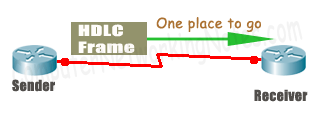
HDLC was designed based on this principle and does not include a field for network-layer information in its header. Without a dedicated field for network-layer protocol information, HDLC supports only one protocol per link.

To support multiple protocols, vendors modify HDLC by adding a type field. This proprietary extension distinguishes a vendor’s HDLC from standard ISO HDLC, leading to incompatibility with other vendors’ implementations. Use PPP for compatibility in multi-vendor setups.

Configuring HDLC encapsulation
HDLC is the default encapsulation on Cisco routers. Unless it has been changed, no configuration is required. If it were modified, such as to PPP, it can be reconfigured easily from interface configuration mode. Protocols and encapsulation methods are interface-specific. For example, you can use HDLC on one serial interface and PPP on another. To change the encapsulation method for an interface, enter interface configuration mode for that interface. In interface configuration mode, use the encapsulation command to change the default encapsulation. For example, the following commands change the encapsulation method for Serial 0/0/0 to HDLC.
Router>enable
Router#configure terminal
Router(config)#interface serial 0/0/0
Router(config-if)#encapsulation hdlc
Router(config-if)#exit
Router(config)#
Verifying HDLC encapsulation
The show interfaces [Interface] command displays interface configuration, including encapsulation.
Router#show interfaces serial 0/0/0
Serial0/0/0 is administratively down, line protocol is down (disabled)
  Hardware is HD64570
  MTU 1500 bytes, BW 1544 Kbit, DLY 20000 usec,
  reliability 255/255, txload 1/255, rxload 1/255
  Encapsulation HDLC, loopback not set, keepalive set (10 sec)
  Last input never, output never, output hang never
  Last clearing of "show interface" counters never
Troubleshooting HDLC encapsulation
You can check the interface status to identify encapsulation-related issues. The show ip interface brief and show interfaces [interface] commands show the interface status.
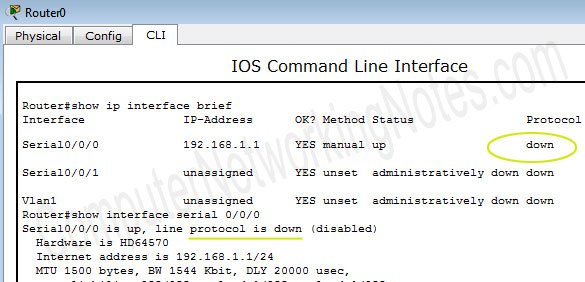
If there is an issue with HDLC implementation, the protocol status will be down. There are three possible reasons for it.
- The remote side router is a different vendor router.
- The remote side is using another protocol, such as PPP.
- The DCE device is not providing a clock rate to the DTE device.
LAN and WAN encapsulation
LAN networks basically use Ethernet links, whereas WAN networks primarily use serial links. HDLC provides encapsulation for serial links. Serial and Ethernet links use different encapsulation methods for data transmission. A serial link cannot carry a frame formatted with Ethernet encapsulation, and vice versa, an Ethernet link cannot carry a frame formatted with serial encapsulation. Ethernet encapsulation methods and protocols are specified in LAN technology. Serial encapsulation methods and protocols are described in WAN technology. A router connects two different technologies. The following example illustrates how it all works together.
Example
The following image shows a network consisting of two LANs and one WAN. PC0 is in the first LAN. PC1 is in the second LAN.
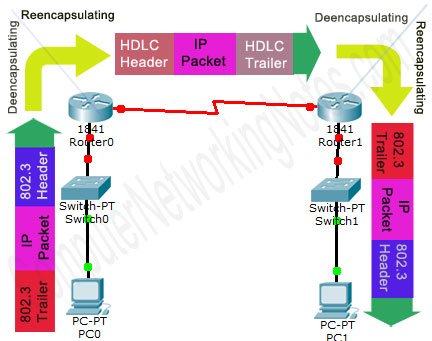
- Suppose PC0 needs to transmit data to PC1. PC0 generates a data packet for this purpose.
- Since PC1 is not on the same LAN segment, PC0's network layer encapsulates the data packet with the default gateway’s IP address.
- The data link layer of PC0 encapsulates the IP packet with an 802.3 header and trailer, forming a frame.
- The physical layer of PC0 transmits this frame onto the physical medium.
- The frame reaches Router0 via the switch.
- Router0 de-encapsulates the frame to extract the packet and determine the Layer 3 destination address.
- Since the destination network is reachable through the Serial interface, the packet is forwarded to it.
- The Serial interface re-encapsulates the packet using the serial encapsulation protocol, which in this example is HDLC.
- After re-encapsulation, the frame is transmitted from the Serial interface.
- The frame reaches Router1's Serial interface.
- Router1 de-encapsulates the frame to extract the packet and identify the Layer 3 destination address.
- Since the destination network is reachable through the Fast Ethernet interface, the packet is forwarded to it.
- The FastEthernet interface re-encapsulates the packet into an Ethernet frame.
- After re-encapsulation, the frame is transmitted from the FastEthernet interface.
- The frame reaches PC1 via the switch.
- PC1 receives the frame in the same format in which it was originally encapsulated by PC0, unaware of the intermediate transmission process.
This tutorial is part of the tutorial series "WAN Terminology Explained with Encapsulation Protocols and Methods". Other parts of this series are the following.
Chapter 1 WAN Tutorial – Basic WAN Switching Concept Explained
Chapter 2 HDLC Protocol and Encapsulation Method Explained
Chapter 3 PPP Protocol and Encapsulation Method Explained
Chapter 4 Basic Concepts of Frame Relay Explained in Easy Language
Chapter 5 How to configure Frame Relay: Step-by-Step Guide
Key points
- HDLC does not provide any kind of authentication.
- HDLC is a byte-oriented protocol. In byte-oriented protocols, control information is encoded using entire bytes.
- The HDLC protocol was developed by ISO for point-to-point links, where a single network-layer protocol transports data.
- ISO’s HDLC does not have a type field in its header.
- Due to the absence of a type field, ISO’s HDLC supports only a single network layer protocol, whereas Cisco HDLC can support multiple protocols through its proprietary type field.
- The type field is used to carry multiple network-layer protocol information.
- Vendors need to insert the type field in the HDLC frame header.
- Once the type field is inserted, HDLC becomes a proprietary protocol.
- A proprietary HDLC protocol from one vendor will not be compatible with HDLC implementations from other vendors. Always ensure both ends of a link use the same vendor’s HDLC if proprietary features are enabled. For cross-vendor environments where this is not possible, use a standard protocol to maintain compatibility.
- HDLC is the default encapsulation method on Cisco routers.
Conclusion
HDLC remains a foundational protocol for serial link encapsulation in WAN environments, particularly for point-to-point connections. Its simplicity and reliability make it a widely used choice. However, limitations such as a lack of authentication and incompatibility between vendor-specific implementations should be carefully considered when designing networks. For environments that require interoperability or advanced features, alternative protocols such as PPP may be more suitable. Understanding HDLC’s operational mechanisms and configuration steps is essential for effective WAN deployment and troubleshooting.
Author Laxmi Goswami Updated on 2026-03-09